Loading
Get Sba 3508s 2021-2026
How it works
-

Open form follow the instructions
-

Easily sign the form with your finger
-

Send filled & signed form or save
How to fill out the SBA 3508S online
Completing the SBA 3508S form is an important step for borrowers seeking loan forgiveness under the Paycheck Protection Program. This guide offers a comprehensive, clear, and user-friendly approach to filling out the form online, ensuring that users have all the necessary information at their fingertips.
Follow the steps to complete the SBA 3508S online.
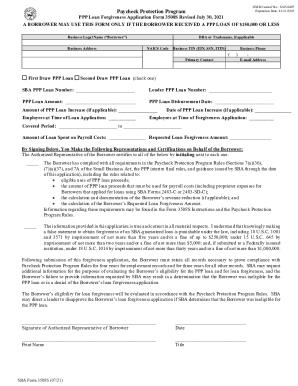
- Click ‘Get Form’ button to obtain the form and open it in the editor.
- Enter your business legal name as it appears on your Borrower Application Form. This is essential for maintaining accurate records.
- Input your business address, including any applicable DBA or tradename, and ensure the NAICS code matches your business activity.
- Provide your Business TIN (EIN, SSN, ITIN) and the primary contact's information, including their phone number and email address.
- Select whether your application is for a First Draw PPP Loan or a Second Draw PPP Loan by checking the appropriate box.
- Fill in the SBA PPP Loan Number and the Lender PPP Loan Number as required.
- Input the total PPP Loan Amount and the date of loan disbursement. If applicable, specify the amount and date of any loan increase.
- Complete the employee count fields: the number of employees at the time of the loan application and at the time of the forgiveness application.
- Define the Covered Period, which starts on the loan disbursement date and ends between 8 to 24 weeks later.
- Enter the amount spent on payroll costs and the total amount of loan forgiveness requested.
- Review and initial next to each representation and certification statement to confirm your compliance with the Paycheck Protection Program rules.
- Lastly, provide your signature, print your name, and include your title before submitting the form.
- After reviewing all entered information, save your changes and choose whether to download, print, or share the form.
Start filling out your SBA 3508S online today to apply for loan forgiveness.