Loading
Get Irs 1099-h 2022-2026
This website is not affiliated with IRS
How it works
-

Open form follow the instructions
-

Easily sign the form with your finger
-

Send filled & signed form or save
How to fill out the IRS 1099-H online
This guide provides a detailed overview of filling out the IRS 1099-H form online, which is used to report health coverage tax credit advance payments. Whether you are unfamiliar with tax forms or looking for specific information, this guide is designed to assist you every step of the way.
Follow the steps to accurately complete the IRS 1099-H form online:
- Press the ‘Get Form’ button to access the IRS 1099-H form and open it for completion.
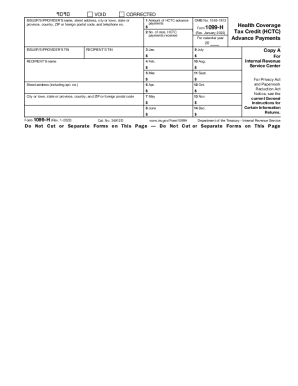
- Enter the issuer's or provider's name and their complete address, including city, state, ZIP code, and telephone number.
- Input the issuer's or provider's taxpayer identification number (TIN).
- In Box 1, record the total amount of health coverage tax credit (HCTC) advance payments received on your behalf.
- In Box 2, indicate the total number of months for which HCTC payments were received.
- For each month from January to December, fill in the amounts received in Boxes 3 through 14. Ensure that these amounts correspond to the total in Box 1.
- Double-check all entries for accuracy and ensure all necessary fields are completed.
- Once everything is filled out, you can save changes to the form. You also have the option to download, print, or share the completed document as needed.
Complete your documents online to ensure timely and accurate filings.
Form 1099-H is a federal income tax form required by the IRS. The form is filed by health insurance providers that receive advance payments on behalf of the taxpayer as a recipient of TAA, ATAA, RTAA, or PBGC.