Loading

Open form follow the instructions

Easily sign the form with your finger

Send filled & signed form or save
How to fill out the Infinisource Login online
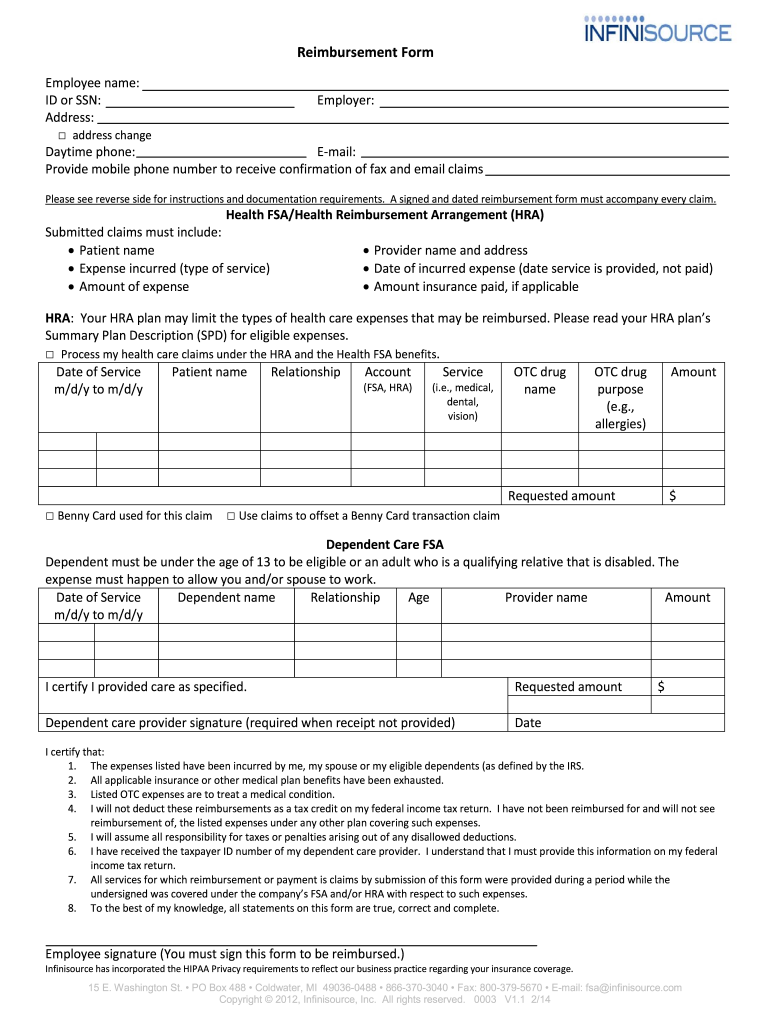
Filling out the Infinisource Login form is a crucial step for individuals seeking reimbursement for healthcare or dependent care expenses. This guide provides a clear, step-by-step approach to assist users in completing the form accurately and efficiently.
Follow the steps to accurately complete the Infinisource Login form.
- Click ‘Get Form’ button to initiate the process of obtaining the reimbursement form.
- Begin by entering your employee name in the designated field. Ensure that the name matches the records with your employer for accuracy.
- Input your ID or SSN in the appropriate section to verify your identity. This information is crucial for processing your claim.
- Provide your employer’s name along with your workplace address. If there is a change in your address, tick the ‘address change’ checkbox.
- Fill in your daytime phone number and email address. It is important to provide a mobile phone number to receive confirmation of fax and email claims.
- For Health FSA or HRA claims, complete the relevant sections with patient names, provider details, service dates, and the corresponding amounts.
- Ensure you sign and date the reimbursement form, as this signature is required to validate your claim.
- Review the documentation requirements on the reverse side of the form. Attach all necessary documentation before submission.
- Save your changes, and you may choose to download or print the completed form for your records.
- Submit the form either by mailing it to the specified address or faxing it to the provided number, ensuring to keep a confirmation for your records.
Complete your Infinisource Login form online today to ensure timely reimbursement for your eligible expenses.
Experience a faster way to fill out and sign forms on the web. Access the most extensive library of templates available.
Related content
For length of coverage and additional information, please refer to your Plan Document or...
To login to your home page, follow these steps: 1. Navigate to the Infinisource login...
Get answers to your most pressing questions about US Legal Forms API.
Why does iSolved not let me log in?
If you encounter login issues with iSolved, it could be due to an incorrect username or password, or even a temporary system error. Make sure your browser is up to date, and try resetting your password through the Infinisource Login page. If problems persist, contacting customer support will help resolve any technical difficulties.
What is isolved FSA?
ISolved FSA is a feature within the iSolved platform designed to manage flexible spending accounts effectively. It helps employees make the most of their pre-tax savings for health-related expenses. Access your account using the Infinisource Login to see how iSolved FSA can optimize your spending.
How do I get my W2 from iSolved?
Retrieving your W2 from iSolved is straightforward. After logging in through the Infinisource Login, navigate to your payroll documents section. There, you will find options to view and download your W2 forms, which makes tax season much less stressful.
What is FSA iSolved?
FSA iSolved is the component of the iSolved platform that specifically deals with flexible spending accounts. This feature allows users to track expenses, submit claims, and access their funds easily. By using your Infinisource Login, you can take full advantage of the FSA tools provided by iSolved.
Is iSolved a TPA?
ISolved is known for providing comprehensive payroll and HR solutions, but it also functions as a third-party administrator (TPA) for various benefits. As a TPA, it manages benefits like FSAs, making the process smoother for both employers and employees. To access your benefits, simply use your Infinisource Login to navigate through iSolved's platform.
What is the meaning of FSA salary?
FSA salary refers to the amount an employee can set aside pre-tax for their flexible spending account. This account allows you to use funds for eligible medical expenses, thus reducing your taxable income. When you utilize the Infinisource Login, you can manage your FSA contributions and maximize your savings effectively.
How do I contact isolved support?
To contact isolved support, visit the Infinisource Login page and look for the support or help section. You can find contact information for customer service, including phone numbers and email options. Reaching out to support will ensure you receive guidance tailored to your specific issue.
What does reset ess login mean in isolved?
Resetting the ESS login in isolved refers to the action of changing your Employee Self-Service account credentials. This process is vital if you cannot remember your current login details. Once you complete the reset, you can use the Infinisource Login page with your new credentials to access your account.
How do I log into isolved for the first time?
To log into isolved for the first time, navigate to the Infinisource Login page. Click on 'First Time User', enter your details as instructed, and set up a new password. This process will help you establish your account for future access.
Why is iSolved not letting me log in?
If iSolved is preventing you from logging in, verify that your internet browser is up to date and has cookies enabled. Additionally, check for any error messages that may indicate the specific issue. If you still have trouble, consider using the password reset feature available on the Infinisource Login page or reach out for technical support.
Use professional pre-built templates to fill in and sign documents online faster. Get access to thousands of forms.
If you believe that this page should be taken down, please follow our DMCA take down process here.