Loading
Form preview
  • US Legal Forms
  • Form Library
  • More Forms
  • More Multi-State Forms
  • Irs 8879-s 2021

Get Irs 8879-s 2021-2026

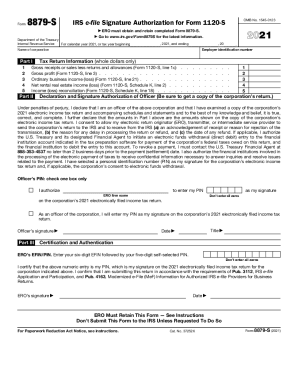
1 Go Department of the Treasury Internal Revenue Service For calendar year 2021, or tax year beginning , 2021, and ending , 20 Part I 1 2 3 4 5 Tax Return Information (whole dollars only) Gross receipts or sales less returns and allowances (Form 1120-S, line 1c) Gross profit (Form 1120-S, line 3) . . . . . . . . . . . . . . Ordinary business income (loss) (Form 1120-S, line 21) . . . . . . . Net rental real estate income (loss) (Form 1120-S, Schedule K, line 2) . . Income (loss) recon.

This website is not affiliated with IRS

How it works

  1. Open form

    Open form follow the instructions

  2. Easily sign form

    Easily sign the form with your finger

  3. Share form

    Send filled & signed form or save

How to fill out the IRS 8879-S online

Filling out the IRS 8879-S form is an essential step for corporate officers to authorize electronic filing of an S corporation's tax return. This guide provides clear instructions on completing the form online to ensure a smooth and accurate submission.

Follow the steps to complete the IRS 8879-S online.

  1. Click 'Get Form' button to access the IRS 8879-S and open it for editing.
  2. Enter the tax return information in Part I. Fill out the gross receipts or sales, gross profit, ordinary business income or loss, net rental real estate income or loss, and income reconciliation using the figures from the corporation's Form 1120-S.
  3. In Part II, provide the employer identification number and the name of the corporation. Select the appropriate option to authorize the Electronic Return Originator (ERO) to enter the PIN or decide to enter it yourself.
  4. Enter your chosen personal identification number (PIN) in the section provided, ensuring it is five digits and not all zeros. If authorizing the ERO, check the corresponding box.
  5. Sign the form as the officer of the corporation in the designated area. Include your title and the date of signing.
  6. Complete Part III by providing the ERO's EFIN and a self-selected PIN, certifying the information is accurate.
  7. Once completed, review the filled-out form for accuracy, and then save your changes. You can also download, print, or share the IRS 8879-S form as needed.

Get started by completing your documents online today.

Get form

Experience a faster way to fill out and sign forms on the web. Access the most extensive library of templates available.
Get form

Related content

About Form 8879-S, IRS e-file Signature...
Aug 26, 2022 — Information about Form 8879-S, IRS e-file Signature Authorization for...
Learn more
Form 8879 (Rev. January 2021) - IRS
Complete Form 8879,. Parts I, II, and III. ERO Responsibilities. The ERO must: 1. Enter...
Learn more
2016 Instruction 1040 - IRS
Dec 15, 2016 — Attach Form(s) 1099R to Form. 1040 if any federal income tax was...
Learn more

Related links form

Client Funds Savings Sub-Account Application Agreement 2020 RAYNET MESSAGE FORM - Raynet-uk 2020 Functional Behavior Assessment Worksheet 2020 PATIENT INTAKE FORM HISTORY - SpineScottsdale Physical ... 2020

Questions & Answers

Get answers to your most pressing questions about US Legal Forms API.

Contact support

Form 8879-CORP, E-file Authorizations for Corporations replaces Form 8879-S, IRS e-file Signature Authorization for Form 1120-S.

If the taxpayer is signing the electronically filed return by using a PIN, use Form 8879, California e-file Signature Authorization for Individuals. If the taxpayer is signing the return via handwritten signature, use Form 8453, California e-file Return Authorization for Individuals.

A corporate officer and an electronic return originator (ERO) use Form 8879-S when the corporate officer wants to use a personal identification number (PIN) to electronically sign an S corporation's electronic income tax return and, if applicable, consent to electronic funds withdrawal.

Form 8878: This is the IRS e-file Signature Authorization used by filers of extension requests on Form 4868 or Form 2350. The latter form is for taxpayers living outside the United States. Form 8879: This is the IRS e-file Signature Authorization required for filers of Form 1040, 1040A, Form 1040EZ or Form 1040-SS.

Form 8879 is the declaration document and signature authorization for an e-filed return filed by an electronic return originator (ERO). Complete this form when: The Practitioner PIN method is used.

Taxpayers, who currently use Forms 8878 or 8879 to sign electronic Forms 1040 federal tax returns or filing extensions, can use an e-signature to sign and electronically submit these forms to their Electronic Return Originator (ERO).

The IRS doesn't specify what technology a taxpayer must use to capture an electronic signature. The IRS will accept images of signatures (scanned or photographed) including common file types supported by Microsoft 365 such as tiff, jpg, jpeg, pdf, Microsoft Office suite or Zip.

A corporate officer and an electronic return originator (ERO) use Form 8879-S when the corporate officer wants to use a personal identification number (PIN) to electronically sign an S corporation's electronic income tax return and, if applicable, consent to electronic funds withdrawal.

Get This Form Now!

Use professional pre-built templates to fill in and sign documents online faster. Get access to thousands of forms.
Get form
If you believe that this page should be taken down, please follow our DMCA take down processhere.
Get IRS 8879-S
Get form
  • Adoption
  • Bankruptcy
  • Contractors
  • Divorce
  • Home Sales
  • Employment
  • Identity Theft
  • Incorporation
  • Landlord Tenant
  • Living Trust
  • Name Change
  • Personal Planning
  • Small Business
  • Wills & Estates
  • Packages A-Z
  • Affidavits
  • Bankruptcy
  • Bill of Sale
  • Corporate - LLC
  • Divorce
  • Employment
  • Identity Theft
  • Internet Technology
  • Landlord Tenant
  • Living Wills
  • Name Change
  • Power of Attorney
  • Real Estate
  • Small Estates
  • Wills
  • All Forms
  • Forms A-Z
  • Form Library
  • Legal Hub
  • About Us
  • Help Portal
  • Legal Resources
  • Blog
  • Affiliates
  • Contact Us
  • Delete My Account
  • Site Map
  • Industries
  • Forms in Spanish
  • Localized Forms
  • State-specific Forms
  • Forms Kit
  • Real Estate Handbook
  • All Guides
  • Notarize
  • Incorporation services
  • For Consumers
  • For Small Business
  • For Attorneys
  • USLegal
  • FormsPass
  • pdfFiller
  • signNow
  • altaFlow
  • DocHub
  • Instapage
Form Packages
  • Adoption
  • Bankruptcy
  • Contractors
  • Divorce
  • Home Sales
  • Employment
  • Identity Theft
  • Incorporation
  • Landlord Tenant
  • Living Trust
  • Name Change
  • Personal Planning
  • Small Business
  • Wills & Estates
  • Packages A-Z
Form Categories
  • Affidavits
  • Bankruptcy
  • Bill of Sale
  • Corporate - LLC
  • Divorce
  • Employment
  • Identity Theft
  • Internet Technology
  • Landlord Tenant
  • Living Wills
  • Name Change
  • Power of Attorney
  • Real Estate
  • Small Estates
  • Wills
  • All Forms
  • Forms A-Z
  • Form Library
Customer Service
  • Legal Hub
  • About Us
  • Help Portal
  • Legal Resources
  • Blog
  • Affiliates
  • Contact Us
  • Delete My Account
  • Site Map
  • Industries
  • Forms in Spanish
  • Localized Forms
  • State-specific Forms
  • Forms Kit
Legal Guides
  • Real Estate Handbook
  • All Guides
Prepared for you
  • Notarize
  • Incorporation services
Our Customers
  • For Consumers
  • For Small Business
  • For Attorneys
Our Sites
  • USLegal
  • FormsPass
  • pdfFiller
  • signNow
  • altaFlow
  • DocHub
  • Instapage
Social Media
Call us now toll free:
+1 833 426 79 33
As seen in:
© Copyright 1999-2026 airSlate Legal Forms, Inc. 3720 Flowood Dr, Flowood, Mississippi 39232
  • Your Privacy Choices
  • Terms of Service
  • Privacy Notice
  • Content Takedown Policy
  • Bug Bounty Program