Loading
Get Usps Ps 3624 1996
How it works
-

Open form follow the instructions
-

Easily sign the form with your finger
-

Send filled & signed form or save
How to fill out the USPS PS 3624 online
This guide provides clear and detailed instructions on how to accurately complete the USPS PS 3624 form online. It is designed to support users of all experience levels in successfully submitting their application for nonprofit standard mail rates.
Follow the steps to easily complete the USPS PS 3624 online.
- Click ‘Get Form’ button to obtain the form and open it in the editor.
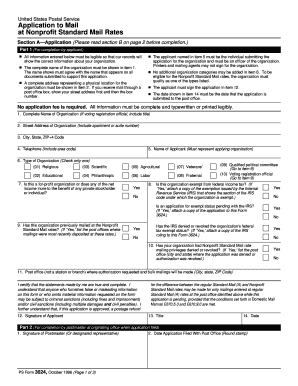
- In item 1, enter the complete name of the organization as it appears on all supporting documents. This information must be clear and precise.
- Provide the organization's physical address in item 2. If applicable, include any apartment or suite numbers, followed by the post office box if you receive mail that way.
- In item 3, fill in the city, state, and ZIP+4 code for the organization’s address.
- Include the organization’s telephone number in item 4, ensuring to include the area code.
- In item 5, specify the name of the applicant. This individual must be an authorized officer of the organization.
- Select the type of organization in item 6 by checking only one option that best describes the organization's primary purpose.
- Answer item 7 regarding for-profit status by selecting either 'Yes' or 'No' as it pertains to the organization.
- Complete items 8 through 10 by answering the questions accurately. If applicable, attach any required documentation demonstrating tax-exempt status.
- For item 11, provide the post office location where mailings will be made. Ensure this is a full address including city and state.
- Confirm the accuracy of your information and sign in item 12 as the applicant.
- Enter the date of application submission in item 14. This should be the current date when you are submitting the form.
- After completing the form, save your changes and download or print the form for your records.
Complete your USPS PS 3624 application online today to ensure you qualify for nonprofit standard mail rates.
Get form
Experience a faster way to fill out and sign forms on the web. Access the most extensive library of templates available.
The nonprofit form for USPS is primarily the USPS PS 3624, which is necessary for organizations seeking mailing discounts. This form requires specific information about your nonprofit status and activities. Submitting this form opens up access to reduced postage rates and other benefits designed for nonprofits. Make sure to follow the guidelines to ensure your application is successful.
Get This Form Now!
Use professional pre-built templates to fill in and sign documents online faster. Get access to thousands of forms.