Loading
Get Uk Form Cyi 2020-2026
How it works
-

Open form follow the instructions
-

Easily sign the form with your finger
-

Send filled & signed form or save
How to fill out the UK Form CYI online
Completing the UK Form CYI online is a crucial step for individuals whose current household income has decreased significantly. This guide offers clear, step-by-step instructions to help you accurately fill out the form and submit it effectively.
Follow the steps to complete the UK Form CYI online.
- Click ‘Get Form’ button to obtain the form and open it in the editor.
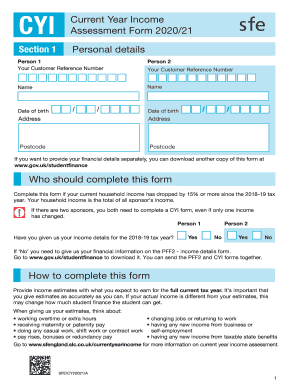
- Input your personal details in Section 1. This includes entering your Customer Reference Number, names, dates of birth, addresses, and postcodes for both Person 1 and Person 2. Ensure all information is accurate.
- Indicate whether you have provided your income details for the 2018-19 tax year. If ‘No’, you will need to download the PFF2 form to provide your income information separately.
- In Section 2, provide details regarding your financial information. Specify if your tax year ends on a date other than 5 April 2021, and if so, provide the specific end date.
- Fill out Section 3, where you estimate your income from salary or wages. Input the expected amounts for both Person 1 and Person 2 in the designated fields, including any cash equivalent of taxable benefits in kind.
- Complete Section 4 by entering estimated taxable income from pensions. Be sure to include all applicable pensions and specify amounts expected during the current tax year.
- In Section 5, provide estimated income from taxable state benefits. Only include income received from specified benefits, ensuring clarity on what qualifies.
- Section 6 requires you to declare expected income from self-employment, foreign income, and property lettings, among other income sources. Ensure accurate estimations for all categories relevant to you.
- In Section 7, estimate your income from savings and investments. Report any expected interest or income from your accounts without disclosing actual totals.
- Finalize your form in Section 8 by disclosing any expected income deductions, such as private pension contributions and allowable expenses. Review your entries for accuracy.
- Before submission, read, sign, and date the Declaration on the last page to confirm the authenticity of your provided information. If necessary, ensure a Power of Attorney signature is included.
- After reviewing all information, save your changes. You can choose to download, print, or share the completed form as needed before submitting it to the appropriate address.
Complete your documents online today for a smoother financial assessment process.