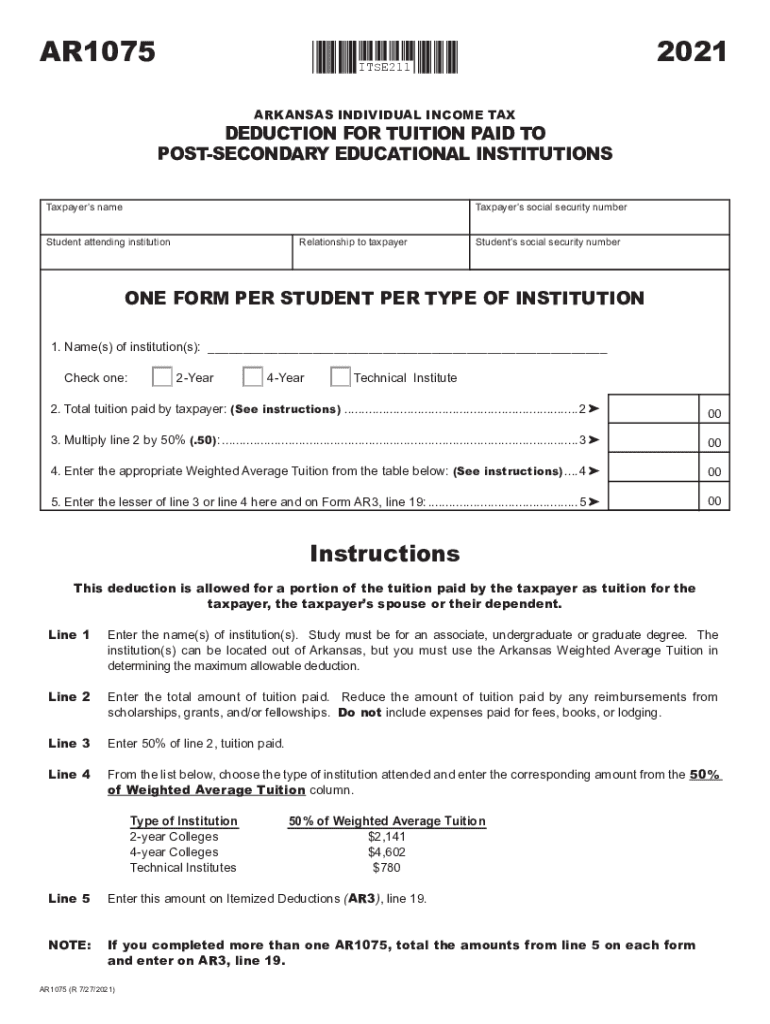
PRINT FORMAR1075CLEAR FORM ITSE2112021ARKANSAS INDIVIDUAL INCOME TAXDEDUCTION FOR TUITION PAID TO POSTSECONDARY EDUCATIONAL INSTITUTIONS Taxpayers nameTaxpayers social security number Relationship.
Loading

Open form follow the instructions

Easily sign the form with your finger

Send filled & signed form or save
How to fill out the Fillable Form Ar1075 - Deduction For Tuition Paid To Post ... online
Filling out the Fillable Form Ar1075 is essential for individuals seeking deductions for tuition paid to post-secondary educational institutions. This guide will provide clear, step-by-step instructions to help you through the process online.
Follow the steps to successfully complete the form.
- Press the ‘Get Form’ button to access the form and open it in the provided interface.
- Fill in the taxpayer’s name in the designated field. Ensure that you enter the full legal name as it appears on your social security card.
- Input the taxpayer’s social security number in the corresponding field carefully to avoid errors.
- Specify the relationship of the student to the taxpayer. This could be yourself, a child, spouse, or another dependent.
- Enter the student attending the institution in the relevant section along with their social security number.
- List the name(s) of the institution(s) attended by the student. Ensure accuracy as this information is critical for the deduction.
- Select one of the provided options indicating the type of educational institution: 2-Year, 4-Year, or Technical Institute.
- Record the total amount of tuition paid by the taxpayer in the specified field. Remember to exclude any reimbursements received from scholarships, grants, or fellowships.
- Calculate 50% of the total tuition paid and enter this amount in the provided section.
- Refer to the weighted average tuition table and enter the relevant figure for the institution type checked in the previous step.
- Determine the lesser amount between line 3 and line 4 and enter this value in line 5 of the form.
- If multiple AR1075 forms were completed, total the amounts from line 5 and ensure these are entered correctly on Form AR3, line 19.
- Once all fields are completed and double-checked for accuracy, save your changes, and download or print the form as needed.
Complete your documentation process online to ensure you receive your tuition deduction smoothly.
Experience a faster way to fill out and sign forms on the web. Access the most extensive library of templates available.
Related content
Get answers to your most pressing questions about US Legal Forms API.
Are property taxes deductible in Arkansas?
Real Estate and Property Taxes: Real estate and property taxes can be deducted as an expense against income. Points Paid on Purchase or Refinanced Loans: The points that you pay at the closing table when you purchase a home are deductible for that year.
Is tuition paid a deduction in Arkansas?
The deduction is limited to the lesser of 50% of the amount actually paid for the tuition or 50% of a “weighted average tuition” for institutes or colleges with the same classification. Amounts paid through scholarships, grants, and fellowships do not qualify. Expenses paid for fees, books, or lodging are not included.
What is the form for Arkansas state tax extension?
Arkansas Tax Extension Form: To request an Arkansas-only extension, file Form AR1055 by the original due date of your return. Arkansas Extension Payment Requirement: An extension of time to file is not an extension of time to pay your Arkansas income tax.
Does Arkansas have a credit for taxes paid to other states?
The credit for taxes paid to another state is automatically calculated in your account when you add a Nonresident return to your already created resident Arkansas return if you pay taxes on the same income to both Arkansas and another state.
Where do I get Arkansas state tax forms?
State Tax Forms The Arkansas Department of Finance and Administration distributes Arkansas tax forms and instructions in the following ways: In Person: Arkansas Revenue Office, 206 Southwest Drive, Jonesboro, AR. Phone: Arkansas Revenue Office, 870-932-2716 (Jonesboro) 1-800-882-9275 (Little Rock)
What is form ar1075?
Instructions. This deduction is allowed for a portion of the tuition paid by the taxpayer as tuition for the taxpayer, the taxpayer's spouse or their dependent.
Is paying off tuition tax deductible?
Tuition and fees are no longer tax deductible after 2020. The tuition and fees deduction was an adjustment to income if you incurred qualified education expenses for you, your spouse, or your dependent.
What is the Arkansas tuition tax credit?
Education Credits This credit can help pay for undergraduate, graduate and professional degree courses — including courses to acquire or improve job skills. There is no limit on the number of years you can claim the credit. It is worth up to $2,000 per tax return.
Use professional pre-built templates to fill in and sign documents online faster. Get access to thousands of forms.
If you believe that this page should be taken down, please follow our DMCA take down process here.