Loading
Get Ca Ftb 541 - Schedule K-1 2021-2026
How it works
-

Open form follow the instructions
-

Easily sign the form with your finger
-

Send filled & signed form or save
How to fill out the CA FTB 541 - Schedule K-1 online
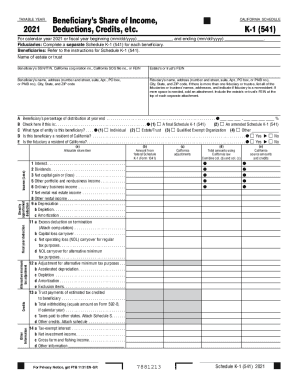
Completing the CA FTB 541 - Schedule K-1 online can streamline the process of reporting a beneficiary's share of income, deductions, and credits for trusts and estates. This guide offers clear, step-by-step instructions to help users fill out the form accurately and efficiently.
Follow the steps to complete the CA FTB 541 - Schedule K-1.
- Click ‘Get Form’ button to acquire the Schedule K-1 (541) and open it in your editor.
- Fill in the taxable year at the top of the form, ensuring it reflects the correct calendar or fiscal year information.
- Enter the name of the estate or trust along with its Federal Employer Identification Number (FEIN).
- Provide the beneficiary’s Social Security Number (SSN), Individual Taxpayer Identification Number (ITIN), California corporation number, California Secretary of State (SOS) file number, or FEIN.
- List the beneficiary’s name, full address (including street, city, state, and ZIP code).
- Complete the fiduciary's details, including their name and full address. If there are multiple fiduciaries, list each along with their details.
- Indicate the beneficiary’s percentage of distribution as of year-end, providing the appropriate percentage value.
- Select whether this is a final or amended Schedule K-1 by checking the corresponding box.
- Describe the type of entity of the beneficiary, marking the appropriate option for individual, estate/trust, qualified exempt organization, or other.
- Indicate residency status for both the beneficiary and the fiduciary, checking ‘Yes’ or ‘No’ for California residency.
- Complete the income sections by transferring amounts from federal Schedule K-1 (Form 1041) for items such as interest, dividends, capital gains, etc.
- Fill in any applicable California adjustments and combine them with federal amounts to reflect totals under California law.
- Provide additional information regarding tax credits and deductions, if applicable.
- Review all entries for accuracy before saving, downloading, or printing the completed Schedule K-1.
Start filling out your documents online for an easier filing experience.
The S corporation uses Schedule K-1 (100S) to report the shareholder's share of the S corporation's income, deductions, credits, etc. Information from the Schedule K-1 (100S) is used to complete your California tax return. Keep a copy of Schedule K-1 (100S) for your records.