Loading
Get California Nonresident State Tax Return Form
How it works
-

Open form follow the instructions
-

Easily sign the form with your finger
-

Send filled & signed form or save
How to fill out the California Nonresident State Tax Return Form online
Navigating tax forms can be complex, especially for nonresidents. This guide provides clear, step-by-step instructions on how to fill out the California Nonresident State Tax Return Form online, ensuring that all users, regardless of their experience level, can complete their tax return accurately and efficiently.
Follow the steps to fill out your tax return form correctly.
- Press the ‘Get Form’ button to access the California Nonresident State Tax Return Form and open it in your preferred editor.
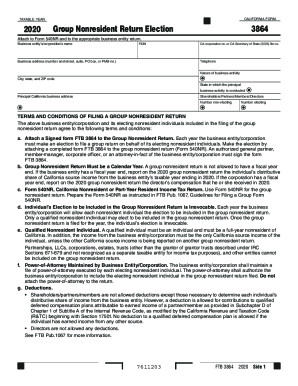
- Begin filling out the section for 'Business entity’s/ccorporation’s name' by entering the full name of the business that is filing the return.
- Provide the Federal Employer Identification Number (FEIN) associated with the business entity.
- Enter the complete business address, including the number and street, suite, PO box, or PMB number.
- If applicable, input the California corporation number or the California Secretary of State (SOS) file number.
- Include a contact telephone number for the business.
- Specify the nature of the business activity conducted by the entity.
- Fill in the city, state, and ZIP code where the business is located.
- Indicate the state in which the principal business activity is conducted.
- List the principal California business address.
- Indicate the number of non-electing shareholders, partners, members, or directors and the number of electing individuals.
- Read and agree to the terms and conditions of filing a group nonresident return, ensuring that you understand the implications for each electing individual.
- Complete the signature and date section, ensuring an authorized individual from the business entity signs and enters their title.
- Finally, save your changes, and choose to download, print, or share the completed form as needed.
Complete your California Nonresident State Tax Return Form online today for a seamless filing experience.
Get form
Experience a faster way to fill out and sign forms on the web. Access the most extensive library of templates available.
What is the difference between Form 540 and 540 2ez? Form 540 2EZ is one of two California Income Tax Forms used by California full-year residents. The other California Income Form used by full-year residents is Form 540.
Get This Form Now!
Use professional pre-built templates to fill in and sign documents online faster. Get access to thousands of forms.