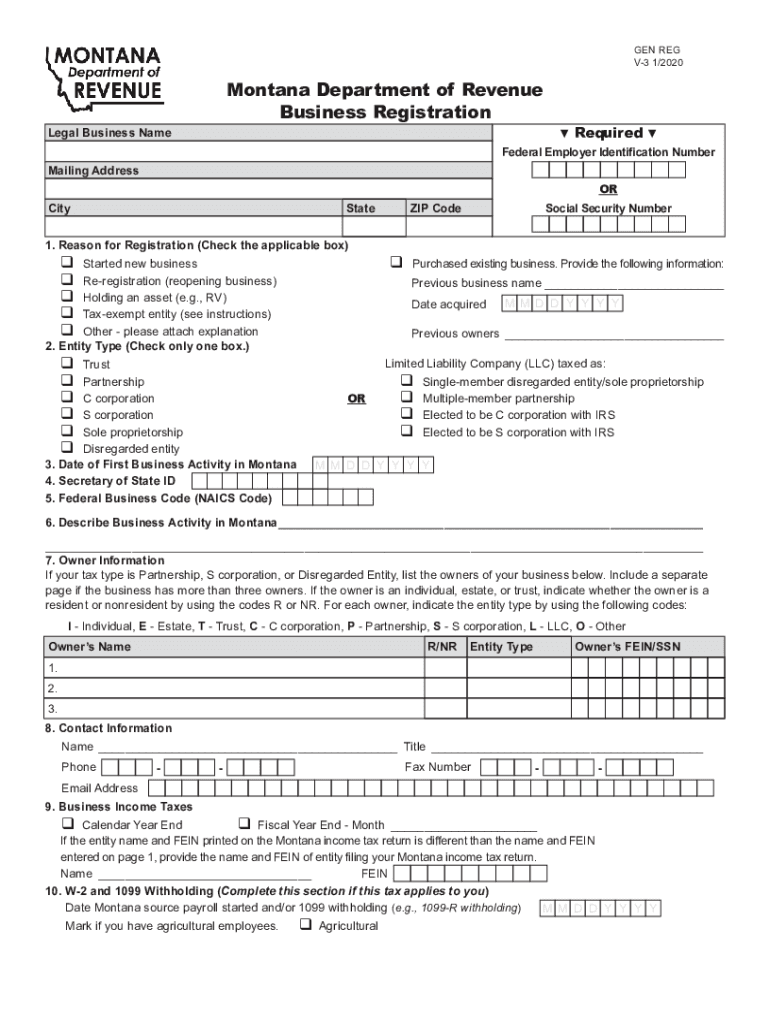
Social Security Number 1. Reason for Registration (Check the applicable box) q Started new business q Purchased existing business. Provide the following information: q Re-registration (reopening business) Previous business name q Holding an asset (e.g., RV) M M D D Y Y Y Y Date acquired q Tax-exempt entity (see instructions) q Other - please attach explanation Previous owners 2. Entity Type (Check only one box.) Limited Liability.
Loading

Open form follow the instructions

Easily sign the form with your finger

Send filled & signed form or save
How to use or fill out the Fillable Online GEN REG Fax Email Print - PdfFiller online
This guide provides clear instructions for completing the Fillable Online GEN REG Fax Email Print form for business registration with the Montana Department of Revenue. Follow these steps to ensure your registration process is smooth and efficient.
Follow the steps to successfully complete your registration form.
- Click the ‘Get Form’ button to access the form and open it in the editor.
- Begin by filling in your Federal Employer Identification Number (FEIN) and/or Social Security Number (SSN) in the designated fields at the top of the form. These are required for identification purposes.
- Enter the legal business name and mailing address in the appropriate sections. Make sure to provide accurate information to avoid issues later.
- Select the reason for registration by checking the applicable box. You may indicate if you started a new business, purchased an existing one, or have other reasons for registering.
- Choose the entity type by checking only one box that best describes your business structure, such as Limited Liability Company (LLC) or S corporation.
- Fill in the date of your first business activity in Montana. This helps the department understand when your business began operations.
- Describe your business activity in Montana in the space provided. This should be a clear and concise description of what your business does.
- Complete the owner information section by listing the owners of your business, including their FEIN or SSN and specify if they are a resident or non-resident.
- Provide contact information for someone who the department can reach out to if they have questions about your registration.
- Complete the business income taxes section by marking whether your business operates on a calendar or fiscal year basis and provide any necessary details.
- Fill in any sections relevant to W-2 and 1099 withholding or mineral royalty withholding, if applicable to your business.
- Indicate any miscellaneous taxes for which you are registering and provide the start date for your business operations in Montana.
- If your business has a parent company, answer the relevant questions about business equipment tax and ownership.
- Finally, review your completed form, sign at the declaration section, and date it. Ensure that the person signing has the authority based on your business structure.
- After verifying all entries, you may save your changes, download the form, or send it via fax or mail to the Montana Department of Revenue.
Complete your business registration online today!
Experience a faster way to fill out and sign forms on the web. Access the most extensive library of templates available.
Related content
Jul 1, 2020 — A Forms · AAP 1 (9/09) - Request For Adoption Assistance Program Benefit...
Feb 13, 2019 — START HERE - Type or print in black ink. ... USCIS Online Account Number...
Get answers to your most pressing questions about US Legal Forms API.
How do I download a file?
0:00 1:04 How to Export Your Documents with Save As in - YouTube YouTube Start of suggested clip End of suggested clip Quality or add a password. When you're done click Save As add a password if necessary. And your PDFMoreQuality or add a password. When you're done click Save As add a password if necessary. And your PDF will download.
What is used for?
About enables users to create fillable PDF forms from scratch or convert an existing form. Some of the document editing tools include typing, erasing, redacting, highlighting and drawing. Users can also place images, logos, notes, text boxes, hyperlinks and video tutorials in PDFs.
Can I download ?
Created for browser-use, it also has desktop and mobile applications for the most convenient and effective work. Register your account and download the application to edit PDF files on Windows. Use your login credentials to start managing your forms. Upload a template from your device.
Is free?
Does have a free trial? All users who want to get to know our product can sign up for a 30-day free trial period. is a paid platform with a competitive pricing model.
How do I save a PDF from without paying?
How do I get a document from without paying? Convert your PDF to a template. Share it via LinkToFill. Open in other browse/incognito and add some invisible change. Click done and submit. After that, you will have download a copy which will allow you to download it.
Can you use for free?
is not affiliated with any government organization. However, provides free access to millions of forms and documents.
How do I print a downloaded PDF file?
Print a PDF Choose File > Print or click icon in the toolbar. Select a Printer and number of Copies to print. (Optional) Click Properties to open the Printer properties.
How can I print for free?
To print a PDF online, go to MY DOCS in your account and select the appropriate document. Click the “Print” button in the menu on the right or open the document in the editor, click the “Done” button or arrow on the right, and then select “Print” option.
Use professional pre-built templates to fill in and sign documents online faster. Get access to thousands of forms.
If you believe that this page should be taken down, please follow our DMCA take down process here.
This form is available in several versions. Select the version you need from the drop-down list below.