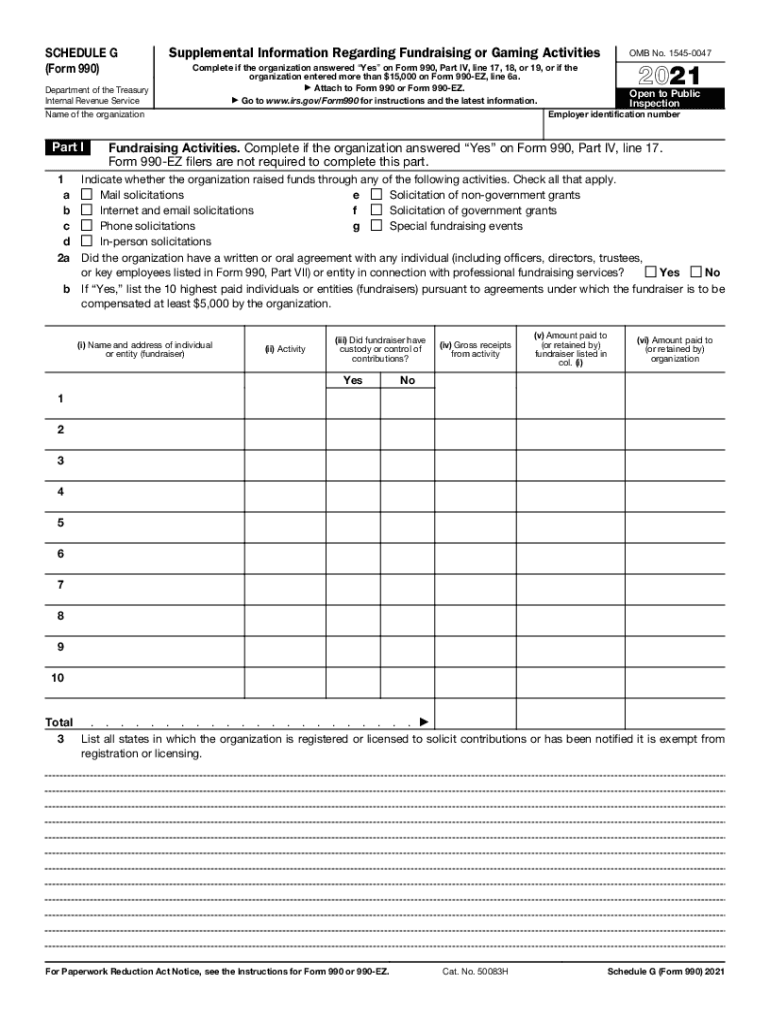
Orm 990, Part IV, line 17, 18, or 19, or if the organization entered more than $15,000 on Form 990-EZ, line 6a. Attach to Form 990 or Form 990-EZ. Go to www.irs.gov/Form990 for instructions and the latest information. 2021 Open to Public Inspection Employer identification number Name of the organization Part I OMB No. 1545-0047 Fundraising Activities. Complete if the organization answered Yes on Form 990, Part IV, line 17. Form 990-EZ filers are not required to complete this.

Open form follow the instructions

Easily sign the form with your finger

Send filled & signed form or save
How to fill out the IRS 990 - Schedule G_DSA online
The IRS 990 - Schedule G_DSA is an essential document for organizations reporting their fundraising and gaming activities. This guide will provide clear and concise instructions for filling out the form online, ensuring you complete each section accurately.
Follow the steps to successfully complete the IRS 990 - Schedule G_DSA online.
- Click ‘Get Form’ button to obtain the form and open it in the editor.
- Review the introductory information provided at the top of the form, which outlines what the Schedule G_DSA encompasses and which organizations must complete it.
- Begin filling out Part I by indicating whether the organization engaged in fundraising activities. Check all activities that apply, such as mail solicitations or special fundraising events.
- Answer question 2 regarding any agreements with individuals or entities for fundraising services. If applicable, list the 10 highest paid fundraisers.
- Complete the section requesting the states where the organization is registered to solicit contributions.
- Move to Part II, where you will report direct expenses and gross receipts related to fundraising activities.
- In Part III, list any fundraising events that resulted in gross receipts greater than $5,000, detailing each event's income and expenses.
- For organizations involved in gaming, fill out the appropriate sections in Part IV, providing detailed information on gaming revenues and any related agreements.
- Provide any supplemental information as required, ensuring you reference prior parts of the form for explanations.
- Once all information is accurately filled in, save your changes and prepare to download, print, or share the completed form as needed.
Start completing your IRS 990 - Schedule G_DSA form online today!
Experience a faster way to fill out and sign forms on the web. Access the most extensive library of templates available.
Related content
Nov 16, 2020 — 129, IRS Form 990 Schedule A, IRS990ScheduleA, Part IV Line 1, Yes...
Form 990-T (2013). Schedule C-Rent Income (From Real Property and Personal Property Leased...
Apr 15, 2015 — section of the Internal Revenue Code. However, if you have no gross...
Get answers to your most pressing questions about US Legal Forms API.
What is Schedule G on 990?
Schedule G (Form 990) is used by an organization that files Form 990 or Form 990-EZ to report professional fundraising services, fundraising events, and gaming.
What is on Schedule G?
This is an Official Bankruptcy Form. Official Bankruptcy Forms are approved by the Judicial Conference and must be used under Bankruptcy Rule 9009.
What is 990 Schedule G Part II?
Part II of Schedule G requires information about the top two fundraising events (other than gaming) and all other fundraising events combined. The college or university completes Part II if it reported more than $15,000 for total special event revenue (including contributions from the event) for the year.
What is Schedule G on tax return?
Use Schedule G (Form 1120) to provide information applicable to certain entities, individuals, and estates that own, directly, 20% or more, or own, directly or indirectly, 50% or more of the total voting power of all classes of the corporation's stock entitled to vote.
What is a Schedule G used for?
Schedule G (Form 990) is used by an organization that files Form 990 or Form 990-EZ to report professional fundraising services, fundraising events, and gaming.
Where do I put PPP loan forgiveness on Form 990?
The information regarding the forgiven PPP loans must be reported on Form 990, 990-EZ, and 990-PF. Amounts of PPP loans that are forgiven must be reported on Form 990, Part VIII, Line 1e (Government grants (contributions)) as contributions from a governmental unit in the tax year that the amounts are forgiven.
What is IRS Form 990 Sch D?
Schedule D (Form 990) is used by an organization that files Form 990 to provide the required reporting for donor advised funds, conservation easements, certain art and museum collections, escrow or custodial accounts or arrangements, endowment funds, and supplemental financial information.
What are the schedules on a tax return?
A tax schedule is a rate sheet used by individual or corporate taxpayers to determine their estimated taxes due. The schedule provides tax rates for given ranges of taxable income, as well as for particular taxable circumstances. The tax schedule is also called the rate schedule or tax rate schedule.
Use professional pre-built templates to fill in and sign documents online faster. Get access to thousands of forms.
If you believe that this page should be taken down, please follow our DMCA take down process here.