Loading
Get Co Dr 0442 2021-2026
How it works
-

Open form follow the instructions
-

Easily sign the form with your finger
-

Send filled & signed form or save
How to fill out the CO DR 0442 online
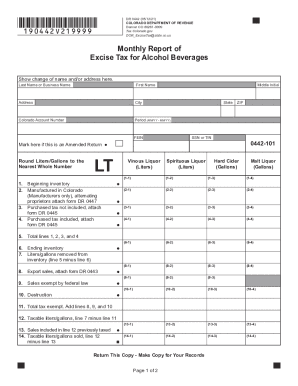
Filling out the CO DR 0442 form is an essential process for Colorado manufacturers and wholesalers of alcoholic beverages. This guide will provide you with clear and detailed instructions to help you complete the form accurately and efficiently online.
Follow the steps to successfully complete the CO DR 0442 form.
- Click ‘Get Form’ button to obtain the CO DR 0442 form and open it in the editor.
- Enter the month’s starting inventory in line 1. This amount should match the ending inventory reported on your previous month's return in line 6.
- For Colorado manufacturers only, report all product manufactured in Colorado that is bottled and ready for sale in line 2. If applicable, alternating proprietors must attach Schedule DR 0447.
- In line 3, enter all products purchased tax-unpaid during the reporting period. Make sure to attach schedule DR 0445.
- For line 4, enter all products purchased tax-paid during the reporting period and likewise attach schedule DR 0445.
- Calculate the total amount of products available for sale in Colorado by adding lines 1, 2, 3, and 4, and enter this total in line 5.
- Record the ending inventory for the month in line 6.
- In line 7, indicate all products sold or removed from inventory by subtracting line 6 from line 5.
- For all products sold outside of Colorado, enter the amount in line 8 and attach schedule DR 0443.
- Enter all sales exempt from Colorado excise tax in line 9, including those delivered to ceded federal property.
- If there were any products that were destroyed or damaged and packaged for final sale, enter this information in line 10. Note that credit is not allowed for spoilage, and an affidavit must be submitted for destruction.
- Calculate the total exempt amount by adding lines 8, 9, and 10, and enter this total in line 11.
- In line 12, calculate taxable liters or gallons by subtracting line 11 from line 7.
- Enter any products included in line 12 that have already had Colorado excise tax paid in line 13.
- Determine the taxable liters or gallons sold by subtracting line 13 from line 12, and record this in line 14.
- Using line 14, multiply by the applicable tax rate indicated in line 15 to calculate the excise tax owed and enter this amount in line 16.
- In line 17, calculate the wine development fee by multiplying the liters sold (line 14) by $0.01.
- Enter the Colorado winery surcharge in line 18, using information from form DR 0450, in sections 18-0 (liters) and 18-1 (surcharge amount).
- For line 19, enter the Colorado winery grape tax of $10.00 per ton for produce used in the Colorado production of wine.
- Calculate the total taxes and fees due by adding lines 16, 17, 18, and 19, and enter this total in line 20.
- If the payment is submitted after the due date, calculate the late filing penalty by multiplying line 20 by 10% and record it in line 21.
- Calculate the interest owed for late payments in line 22 by multiplying line 20 by 1% for each month the payment is late.
- Finally, sum lines 20, 21, and 22 to determine the total amount owed and enter this in line 23.
- After completing the form, you can save your changes, download, print, or share the form as required.
Complete your CO DR 0442 form online today for a seamless filing experience.
co form 104. colorado 104 form. colorado state income tax forms. co 104. colorado 104.