Loading
Get State Of New Mexico - Taxation And Revenue Department Tax ...
How it works
-

Open form follow the instructions
-

Easily sign the form with your finger
-

Send filled & signed form or save
How to fill out the State Of New Mexico - Taxation And Revenue Department Tax Information Authorization online
Completing the State Of New Mexico - Taxation And Revenue Department Tax Information Authorization form online is a straightforward process. This guide will provide you with step-by-step instructions to ensure your submission is accurate and complete.
Follow the steps to complete the form effectively.
- Click ‘Get Form’ button to obtain the form and open it in your preferred editor.
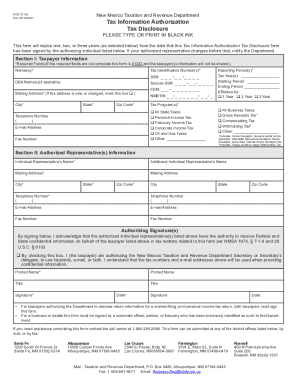
- In Section I, provide the taxpayer information. Fill in the required fields, which include the names, tax identification numbers, and mailing address. Ensure that any new or changed address is marked appropriately.
- Select the tax programs applicable to your situation by checking the relevant boxes. You can choose options such as personal income tax, corporate income tax, or other specific tax programs.
- Indicate the reporting periods by entering the tax years, starting periods, and ending periods. Choose the duration for which the authorization is effective, whether for one, two, or three years.
- In Section II, fill out the authorized representative(s) information. This section requires the individual representative's name, mailing addresses, and contact information.
- Authorize the representative(s) by signing and dating the form. If it is for a married couple filing jointly, ensure both signatures are present.
- Once all sections are completed accurately, review the form for errors. After verifying the information, save your changes, download the form, and print it if needed.
- Submit the form by mail, fax, or at one of the designated district offices. Ensure it reaches the Taxation and Revenue Department in a timely manner.
Complete your forms online today for a seamless experience!
Related links form
Pay online on Taxpayer Access Point (TAP) Making a payment online at the department website, Taxpayer Access Point (TAP). TAP is fast, easy, and electronic check payments are free. After you submit your payment information, you will receive an online confirmation.
Industry-leading security and compliance
US Legal Forms protects your data by complying with industry-specific security standards.
-
In businnes since 199725+ years providing professional legal documents.
-
Accredited businessGuarantees that a business meets BBB accreditation standards in the US and Canada.
-
Secured by BraintreeValidated Level 1 PCI DSS compliant payment gateway that accepts most major credit and debit card brands from across the globe.