Loading
Get Form It 601 Claim For Ez Wage Tax Credit Tax Year - Fill ...
How it works
-

Open form follow the instructions
-

Easily sign the form with your finger
-

Send filled & signed form or save
How to fill out the Form IT 601 Claim For EZ Wage Tax Credit Tax Year - Fill ... online
Filing the Form IT 601 is essential for claiming the EZ wage tax credit. This guide provides clear, step-by-step instructions to help users complete the form accurately and efficiently online.
Follow the steps to successfully fill out the form online.
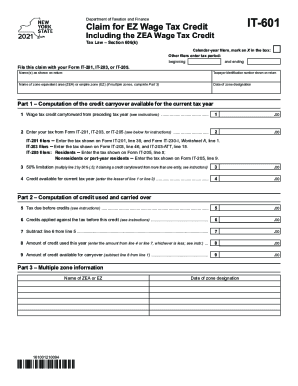
- Press the ‘Get Form’ button to obtain the form, which will open it in the appropriate online editor.
- Begin by filling in your name(s) as shown on your tax return, and include your taxpayer identification number. This ensures that your claim is properly linked to your tax profile.
- Indicate the name of your zone equivalent area (ZEA) or empire zone (EZ). If you are claiming from multiple zones, be sure to complete Part 3.
- Record the date of zone designation. This is crucial for determining eligibility and the timeline for your claim.
- In Part 1, enter the wage tax credit carryover available from the preceding tax year in Line 1. This is the amount you are eligible to claim based on prior filings.
- For Line 2, enter the tax amount from Form IT-201, IT-203, or IT-205. Follow the specific instructions provided for your form to ensure accuracy.
- Calculate the 50% limitation in Line 3 by multiplying the value from Line 2 by 50%. If you are claiming from multiple entities, make sure to refer back to the provided instructions.
- In Line 4, enter the lesser value between Line 1 and Line 3 to determine the credit available for the current tax year.
- Proceed to Lines 5 and 6 to calculate the tax due before credits and any other credits that may apply. Make sure to subtract Line 6 from Line 5 in Line 7.
- In Line 8, indicate the amount of credit used this year, which should be the lesser of the values from Line 4 or Line 7.
- Lastly, compute the amount of credit available for carryover in Line 9 by subtracting Line 8 from Line 1.
- Once all fields are completed, review your entries for accuracy. Then, save your changes, download the form, print it, or share it as necessary.
Complete your Form IT 601 online today to ensure you claim your EZ wage tax credit accurately.
Eligible technologies include solar thermal process heat, solar thermal electric, solar water heat, solar space heat, fuel cells, geothermal direct use, biomass, wind, geothermal heat pumps, and others.
Industry-leading security and compliance
US Legal Forms protects your data by complying with industry-specific security standards.
-
In businnes since 199725+ years providing professional legal documents.
-
Accredited businessGuarantees that a business meets BBB accreditation standards in the US and Canada.
-
Secured by BraintreeValidated Level 1 PCI DSS compliant payment gateway that accepts most major credit and debit card brands from across the globe.