Loading
Get Pa Dor 83-e669 2020-2026
How it works
-

Open form follow the instructions
-

Easily sign the form with your finger
-

Send filled & signed form or save
How to fill out the PA DoR 83-E669 online
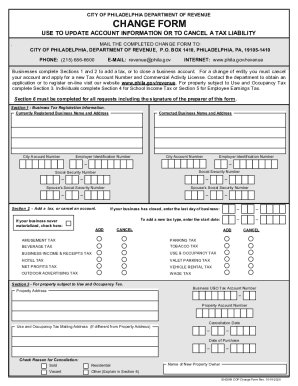
The PA DoR 83-E669 form, also known as the Change Form, is designed for individuals and businesses in Philadelphia to update their account information or cancel a tax liability. This guide provides a user-friendly, step-by-step approach to successfully complete this form online, ensuring all necessary details are correctly recorded.
Follow the steps to fill out the PA DoR 83-E669 form online.
- Press the ‘Get Form’ button to access the PA DoR 83-E669 form and open it in your chosen document editor.
- In Section 1, provide your currently registered business name and address. If there are any corrections, fill in the corrected business name and address alongside the Employer Identification Number and City Account Number.
- For businesses needing to add a tax or cancel an account, complete Section 2 by specifying the last day of business if applicable, or entering the start date for the new tax type.
- If your property is subject to Use and Occupancy Tax, proceed to Section 3. Fill in the property address and related tax account numbers, along with the reason for any cancellation.
- In Section 4, if you are correcting School Income Tax information, enter the current and corrected taxpayer name and address along with Social Security numbers as needed.
- Section 5 focuses on Employee Earnings Tax. Provide the current and corrected taxpayer name and address, along with reasons for cancellation.
- Finally, complete Section 6, ensuring it is filled out for all requests. Include your contact information, date, and signature to validate your submission.
- Once you have filled out all necessary sections, save your changes, and then download, print, or share the completed form as required.
Start completing the PA DoR 83-E669 form online today to ensure your tax information is up to date.
What's not taxable Inheritances, gifts and bequests. Cash rebates on items you purchase from a retailer, manufacturer or dealer. Alimony payments (for divorce decrees finalized after 2018) Child support payments. Most healthcare benefits. Money that is reimbursed from qualifying adoptions. Welfare payments.