Loading
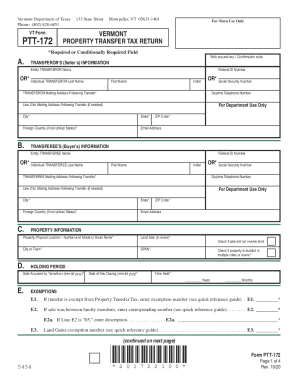
Get Vt Dot Ptt-172 (formerly Pt-172) 2020-2026
How it works
-

Open form follow the instructions
-

Easily sign the form with your finger
-

Send filled & signed form or save
How to fill out the VT DoT PTT-172 (formerly PT-172) online
This guide provides a thorough overview of how to complete the Vermont Department of Taxes Property Transfer Tax Return form (VT DoT PTT-172) online. With clear, step-by-step instructions, users of all backgrounds can confidently navigate the form and submit it without difficulty.
Follow the steps to fill out the form online effectively.
- Click the ‘Get Form’ button to access the form and open it in your preferred editor.
- Begin by filling out the web request key or confirmation code in the designated field.
- Provide the transferor’s information, including either entity or individual details such as name, federal ID number, and mailing address after the transfer.
- Next, input the transferee’s information, filling out either entity or individual details similar to the transferor's section.
- In the property information section, specify the physical location of the property and the size of the land in acres, as well as the corresponding city or town.
- Complete the holding period section by entering the date the property was acquired and the date of closing.
- If applicable, fill in any exemptions using the exemption numbers provided in the quick reference guide.
- Detail the transfer information, including how the transferor acquired the property and the interest being conveyed.
- Indicate whether the property is linked to any agricultural or managed forest land use value program.
- In the real estate withholding certification section, specify whether the income tax has been withheld and fill in exemption numbers as required.
- Complete the tax calculation section by entering specific values based on property transactions and applicable tax rates.
- Review all answers for accuracy and ensure that every required field is filled. Once completed, you can save changes, download, print, or share the form.
Take the next step and complete your documents online with ease.