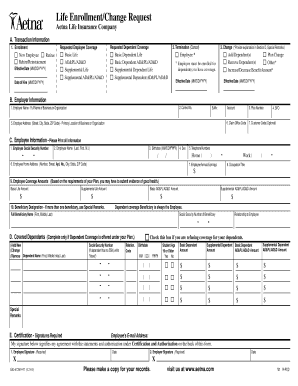
T Effective Date (MM/DD/YYYY) Basic Life AD&PL/AD&D Supplemental Life Supplemental AD&PL/AD&D 2. Termination (Cancel) Basic Dependent Life Basic Dependent AD&PL/AD&D Supplemental Dependent Life Supplemental Dependent AD&PL/AD&D Date of Hire (MM/DD/YYYY) 3. Change (*Provide explanation in Section D, Special Remarks.) Employee * Add Dependent(s) Plan Change Remove Dependent(s) Other* Increase/Decrease Benefit Amount* * Employee must be enrolled for dependent(s) to have coverage. Effective.
Open form follow the instructions
Easily sign the form with your finger
Send filled & signed form or save
How to fill out the Aetna GR-67269-97 online
Filling out the Aetna GR-67269-97 form is an essential step for enrolling, changing, or terminating life insurance coverage. This guide provides clear, step-by-step instructions to help you complete the form online effectively.
Follow the steps to complete the Aetna GR-67269-97 form online.
- Press the ‘Get Form’ button to obtain the Aetna GR-67269-97 form and open it in your preferred editor.
- In Section A, Transaction Information, decide whether you are enrolling, terminating, or changing your coverage. Fill out the requested information such as effective date and specific coverage types (e.g., Basic Life, Supplemental Life).
- If enrolling, check the appropriate boxes for employee and dependent coverage under Section A and complete the effective date.
- For termination of coverage, complete the effective date and check the applicable box under Section A, Transaction Information - Number 2.
- When making changes in Section A, indicate whether you are adding, removing, or changing dependent coverage. Provide a detailed explanation in Section D, Special Remarks.
- In Section B, Employer Information, fill in your employer's full name, address, and any other information required. Make sure to reference any preprinted Control, Suffix, and Account numbers.
- Complete Section C, Employee Information, by entering your Social Security Number, name, birthdate, contact information, and occupation. Make sure the fields are filled correctly.
- In Section D, Covered Dependents, add details of any dependents for whom you are requesting coverage. Include full names, Social Security Numbers, relationship to you, and other required information.
- Lastly, in Section E, Certification, read the statements, sign, and date the form. Ensure you agree with the terms outlined regarding the health condition requirements and the consequences of misrepresentation.
- Once you have filled out all sections and reviewed your entries for accuracy, save changes, download, print, or share the completed form as necessary.
Start completing your Aetna GR-67269-97 form online today.
Experience a faster way to fill out and sign forms on the web. Access the most extensive library of templates available.
Related content
Jan 1, 2007 — GR 67269. AETNA ENROLLMENT/CHANGE. REQUEST. BENEFITS. Permanent ... RI...
Collection: Georgia Government Publications; Serial: Report of the Insurance Department of...
Get answers to your most pressing questions about US Legal Forms API.
How do I get a copy of my Aetna card?
To receive a copy of your Aetna card, log in to your Aetna account and navigate to the section where your card is available for viewing and printing. If you need a replacement card, you can also request one through your account or reach out to Aetna's customer support for help. It's essential to have your Aetna GR-67269-97 card for all your healthcare needs.
Where can I find an Aetna dental insurance card?
Your Aetna dental insurance card is available through your Aetna member account online or via the Aetna mobile app. If you do not have access to the digital version, you can request a physical card by contacting Aetna's customer service. Keeping your Aetna GR-67269-97 card accessible ensures you have your insurance information when you go for dental visits.
How can I get an Aetna digital ID card?
You can easily obtain an Aetna digital ID card through the Aetna mobile app or by logging into your member account online. Once you are logged in, you can access and save or share your digital ID. Having your Aetna GR-67269-97 digital ID card handy allows for quick access to your benefits anytime.
How do I submit a claim to Aetna reimbursement?
Submitting a claim for Aetna reimbursement involves completing the claim form and including the necessary documentation for your service. You can find the claim form on the Aetna website or your member portal. Follow the instructions carefully to ensure a smooth process for your Aetna GR-67269-97 reimbursement.
How do I get my Aetna prior authorization?
To acquire prior authorization through Aetna, you typically need to have your healthcare provider submit a request on your behalf. This request will outline the necessity of the service or medication. You can track the status of your prior authorization by logging into your Aetna GR-67269-97 account or contacting customer support directly for updates.
How to download Aetna insurance card?
You can easily download your Aetna insurance card by logging into your Aetna account on the company’s website or mobile app. Once you access your account, look for the option to view or download your insurance card. This method gives you a quick way to access your Aetna GR-67269-97 card whenever needed.
How do I get my Aetna dental insurance card?
To obtain your Aetna dental insurance card, you can log in to your Aetna member account online. After logging in, navigate to the 'Member Services' section, where you can access and print your card. If you encounter any issues, consider contacting Aetna customer service for assistance with your Aetna GR-67269-97 plan.
Does Aetna give you a card?
Yes, Aetna provides a card to its members for identification and easy access to their health services. This card includes essential information such as your member ID and contact details. Keeping your Aetna GR-67269-97 card handy can facilitate a smoother experience when seeking services.
How do I get my Aetna medical card?
To obtain your Aetna medical card associated with the Aetna GR-67269-97 plan, simply log into your Aetna online account. From there, you can view and print your digital card or request a physical card if you haven't received it in the mail. Aetna aims to ensure that you have easy access to your insurance information, so don't hesitate to reach out to their customer service for any assistance needed in this process.
Does my health insurance company have access to my medical records?
Your health insurance company, including Aetna under the policy Aetna GR-67269-97, may have access to your medical records for administering your plan and processing claims. This access is typically authorized under confidentiality agreements and regulations. However, you still have rights to your health information, and you can request to see what records are held. Being informed about your rights can help you manage your healthcare choices effectively.
Use professional pre-built templates to fill in and sign documents online faster. Get access to thousands of forms.
If you believe that this page should be taken down, please follow our DMCA take down process here.