Loading
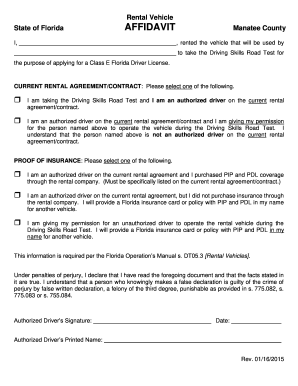
Get Rental Vehicle Affidavit - Taxcollectorcom
How it works
-

Open form follow the instructions
-

Easily sign the form with your finger
-

Send filled & signed form or save
How to fill out the Rental Vehicle Affidavit - Taxcollectorcom online
Filling out the Rental Vehicle Affidavit is a crucial step for individuals planning to take the Driving Skills Road Test in Florida. This guide provides clear, step-by-step instructions to help you complete the affidavit online with confidence.
Follow the steps to effectively complete the affidavit.
- Click ‘Get Form’ button to obtain the form and open it in your editing tool.
- Begin by entering the name of the county where the rental vehicle is used, such as Manatee County.
- Specify the person who rented the vehicle to take the Driving Skills Road Test. They should be clearly identified in the designated space.
- Indicate your relationship to the individual above and clarify your role in the rental agreement by selecting the appropriate option from the current rental agreement/contract section.
- In the proof of insurance section, select the appropriate option that reflects your insurance status and whether you purchased coverage through the rental company or possess an independent Florida insurance policy.
- Review the declaration statement to ensure that you understand the implications of false information. Your electronic approval will reflect your agreement to the statements made.
- Sign the affidavit electronically, entering your name as the authorized driver where indicated.
- Include the date of signing in the corresponding field.
- Finally, save your changes, and you may have the option to download, print, or share the completed affidavit.
Complete your documents online today to ensure a smooth process for your Driving Skills Road Test.
Related links form
If you don't own a car, you may be able to borrow or rent a vehicle for your driving test.