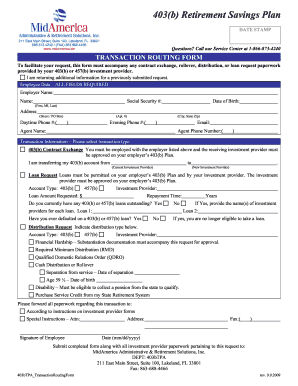
0 TRANSACTION ROUTING FORM To facilitate your request, this form must accompany any contract exchange, rollover, distribution, or loan request paperwork provided by your 403(b) or 457(b) investment provider. I am returning additional information for a previously submitted request. Employee Data – ALL FIELDS REQUIRED Employer Name: Name: Social Security #: Date of Birth: (First, MI, Last) Address: (Street / PO Box) Daytime Phone #:( (Apt. #) ) (City, State Zip) Evening Phone #:( ) A.
Loading
Open form follow the instructions
Easily sign the form with your finger
Send filled & signed form or save
How to fill out the MidAmerica 403(b) Retirement Savings Plan online
Completing the MidAmerica 403(b) Retirement Savings Plan online is a straightforward process that allows users to manage their retirement savings effectively. This guide provides clear, step-by-step instructions to help users fill out the necessary form confidently.
Follow the steps to complete your retirement savings plan form online.
- Press the ‘Get Form’ button to obtain the necessary form and open it in your editor.
- Complete the 'Employee Data' section. All fields are required. Enter your employer's name, your full name, Social Security number, date of birth, address (including street, city, state, and zip), and your daytime and evening phone numbers.
- Provide the contact details for your agent, including their name, email address, and phone number.
- In the 'Transaction Information' section, select the type of transaction you are initiating, such as a 403(b) contract exchange, loan request, or distribution request.
- For a contract exchange, specify your current and new investment provider. Ensure that your current employer allows this transaction.
- If requesting a loan, confirm that loans are permitted under your employer’s plan. Fill in the account type, loan amount requested, and the repayment time. Indicate if you currently have outstanding loans and if you have ever defaulted on a loan.
- For distribution requests, indicate the account type and the distribution type. Provide the necessary information based on your circumstances, including financial hardship or separation from service.
- Include any special instructions and ensure all paperwork accompanies this form for processing.
- Finally, sign and date the form. Submit the completed form, along with all required investment provider documentation, to MidAmerica Administrative & Retirement Solutions, Inc. by mail or fax.
Complete your MidAmerica 403(b) Retirement Savings Plan form online today to take a step toward securing your retirement.
Experience a faster way to fill out and sign forms on the web. Access the most extensive library of templates available.
Related content
MidAmerica Administrative & Retirement Solutions 402 S Kentucky Ave, Suite ... section...
Contract Exchange | For 403(b) plans. MidAmerica will coordinate and obtain approval from...
Customers can choose from a wide variety of checking accounts, savings accounts and...
Get answers to your most pressing questions about US Legal Forms API.
Can I open a 403b on my own?
Opening a 403(b) retirement account typically requires an employment relationship with an eligible organization, so initiating one on your own may not be possible. However, if your employer offers the MidAmerica 403(b) Retirement Savings Plan, you can easily enroll through them. If you need an independent solution, consider speaking with a financial advisor who can help you explore alternative retirement savings options.
How much should I put in my 403b per paycheck?
The amount you should contribute to your MidAmerica 403(b) Retirement Savings Plan each paycheck depends on your financial situation and retirement goals. A common recommendation is to aim for 10% to 15% of your salary if possible, but even smaller amounts can add up over time. It's important to assess your budget and adjust your contributions to maximize potential growth while ensuring you meet your current financial needs.
How do I set up a 403b retirement plan?
Setting up your MidAmerica 403(b) Retirement Savings Plan is straightforward. You will typically need to fill out an enrollment form provided by your employer. After completing the form, discuss your investment choices and contribution amounts with a representative, ensuring that you make informed decisions that align with your retirement goals.
How to start a 403b retirement plan?
To begin your MidAmerica 403(b) Retirement Savings Plan, first, gather necessary documents such as your employee identification and tax information. Then, consult with your employer's human resources department to understand eligibility and contribution limits. They can provide guidance on the specific steps to set up your account and choose investment options.
What happens to my 403b when I resign?
When you resign, your MidAmerica 403(b) Retirement Savings Plan can remain intact, or you may choose to transfer the funds. This decision often depends on your next steps regarding future employment and financial goals. It is crucial to understand the implications of any decision you make, as withdrawal could subject you to taxes and penalties. For clear guidance, consider consulting with a financial advisor or visiting uslegalforms for suitable solutions.
How to get a 403b plan?
You can enroll in a MidAmerica 403(b) Retirement Savings Plan through your employer. Typically, this involves completing an enrollment form and choosing your contribution amount. Your employer will provide the necessary details on how to set up the plan, making it an accessible option for employees involved in eligible educational or nonprofit organizations. If your employer does not offer this plan, consider discussing the possibility with your HR department.
What is one disadvantage of a 403 B retirement plan?
One potential disadvantage of a 403(b) retirement plan is the limited investment options compared to other retirement accounts. With the MidAmerica 403(b) Retirement Savings Plan, your choices may be restricted to the funds offered by your employer. This limitation could affect the growth potential of your savings. Always evaluate your investment options to ensure they align with your retirement goals.
How can I access my 403b account?
Accessing your MidAmerica 403(b) Retirement Savings Plan account is straightforward. You can log in through the MidAmerica online portal using your credentials. Once logged in, you will be able to view your balance, manage investments, and make withdrawals if necessary. For detailed instructions or help, you can reach out to their customer service team.
What happens to my 403b if I quit my job?
If you choose to leave your job, your MidAmerica 403(b) Retirement Savings Plan remains yours. You can decide to keep the funds in your account, roll them over to another retirement plan, or withdraw the funds. However, withdrawing can result in tax implications and penalties. It is recommended to review your options carefully to make the best decision for your financial future.
How much should I put in my 403b per month?
Determining how much to contribute to your MidAmerica 403(b) Retirement Savings Plan depends on your individual financial goals and budget. A common recommendation is to start by contributing at least enough to receive any employer match, if available. As a general guideline, aiming for 10% to 15% of your gross income is often suggested for long-term retirement planning.
Use professional pre-built templates to fill in and sign documents online faster. Get access to thousands of forms.
If you believe that this page should be taken down, please follow our DMCA take down process here.
This form is available in several versions. Select the version you need from the drop-down list below.