Loading
Get Dr Battery Review
How it works
-

Open form follow the instructions
-

Easily sign the form with your finger
-

Send filled & signed form or save
How to fill out the Dr Battery Review online
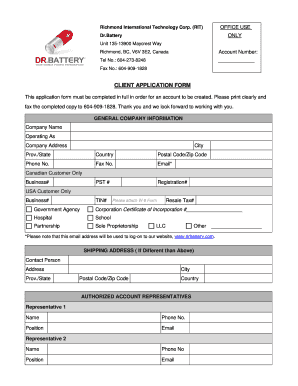
Filling out the Dr Battery Review is an important step for creating an account with Richmond International Technology Corp. This guide will walk you through the process of completing the form accurately and effectively.
Follow the steps to successfully complete your application
- Click the ‘Get Form’ button to obtain the application form and open it in your preferred form editor.
- Fill out the general company information, including the company name, operating as name, and complete address details such as city, province/state, country, and postal code/zip code. Ensure to provide a valid phone number and fax number, and include an email address that will be used for account login. If applicable, enter your PST and registration numbers.
- For Canadian customers, provide your business number; for USA customers, include your TIN. Indicate your classification by checking the appropriate box, and if your organization is a corporation, include the certificate of incorporation number.
- If your shipping address is different from the above, fill in the contact person's name, shipping address, city, province/state, postal code/zip code, and country.
- List authorized account representatives by providing their names, phone numbers, positions, and email addresses. You can enter information for up to two representatives.
- Provide details on trade references. For each reference, include the company name, account number, contact person, industry, phone number, fax number, address, website, city, payment method, province/state, postal code/zip code, and country. Specify the terms and monthly limit if applicable or indicate if payment will be made via credit card.
- Indicate the products of interest by checking all relevant boxes, including options like laptop batteries and accessories.
- At the end of the form, confirm the accuracy of the information provided by signing, printing your name, and dating the form.
- Once you have filled out the form completely, save your changes. You can then download, print, or share the completed form as needed.
Complete your documents online for a streamlined application process.
Yes, using a battery compatible with your laptop model is crucial for optimal performance and safety. Mismatched batteries can lead to overheating or damage. To ensure you choose the correct battery, check reviews and specifications, including those provided by Dr Battery Review.