Loading
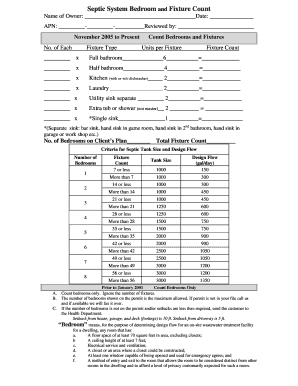
Get Microsoft Word Fixtures
How it works
-

Open form follow the instructions
-

Easily sign the form with your finger
-

Send filled & signed form or save
How to fill out the Microsoft Word Fixtures online
Filling out the Microsoft Word Fixtures form is an essential step for ensuring your septic system meets local requirements. This guide will walk you through each section and field of the form, providing clear and supportive instructions tailored to users of all experience levels.
Follow the steps to accurately complete the form
- Press the ‘Get Form’ button to obtain the document and open it in your preferred editor.
- Begin by entering the name of the owner in the designated field. Make sure to include the full legal name.
- Next, fill in the date of completion in the provided space. Use the format MM/DD/YYYY.
- Input the Assessor's Parcel Number (APN) in the specified field. This identifier helps local agencies process your form efficiently.
- In the Reviewed by section, provide your name or the name of the individual designated to review the form.
- In the 'Count Bedrooms and Fixtures' section, you will need to specify the number of each type of fixture. Fill in the number for each category: full bathroom, half bathroom, kitchen, laundry, utility sink, extra tub or shower, and single sink. Multiply the number of units per fixture by the count to get the fixture count for each category.
- Record the total number of bedrooms in the Client’s Plan. This is crucial for septic tank size assessment.
- Calculate the Total Fixture Count based on your previous entries. Verify calculations for accuracy.
- Review the criteria for septic tank size and design flow to ensure compliance with regulations. Utilize the table provided in the form to determine the appropriate tank size based on your total fixture count and number of bedrooms.
- Finally, revisit the sections regarding bedroom definitions and setbacks. Ensure that the described parameters align with your details, and if applicable, contact the Health Department for any clarifications required.
- After reviewing all entries for accuracy, save any changes made to the document, then proceed to download, print, or share the completed form as needed.
Complete your Microsoft Word Fixtures document online today to ensure compliance and proper septic tank sizing.
To find and apply a template in Word, do the following: On the File tab, click New. Under Available Templates, do one of the following: To use one of the built-in templates, click Sample Templates, click the template that you want, and then click Create.
Industry-leading security and compliance
US Legal Forms protects your data by complying with industry-specific security standards.
-
In businnes since 199725+ years providing professional legal documents.
-
Accredited businessGuarantees that a business meets BBB accreditation standards in the US and Canada.
-
Secured by BraintreeValidated Level 1 PCI DSS compliant payment gateway that accepts most major credit and debit card brands from across the globe.