Loading
Get Lff Rlp
How it works
-

Open form follow the instructions
-

Easily sign the form with your finger
-

Send filled & signed form or save
How to fill out the Lff Rlp online
Filling out the Lff Rlp form online can streamline the process of applying for benefits. This guide provides clear, step-by-step instructions to help you complete each section accurately and efficiently.
Follow the steps to fill out the Lff Rlp form online seamlessly.
- Click the ‘Get Form’ button to access the form and open it in your editing interface.
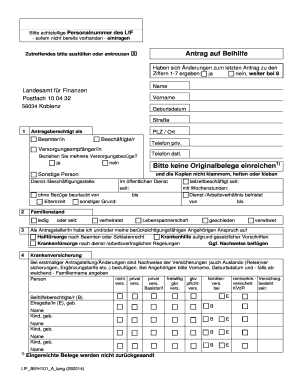
- Begin by entering your eight-digit personnel number if you do not have it recorded elsewhere.
- Indicate if there have been any changes since your last benefit application by selecting 'yes' or 'no' for items 1-7.
- Fill in your personal information, including your name, date of birth, and contact details. Ensure accuracy as it will be verified.
- Specify your employment status by identifying whether you are a civil servant, employee, or other relevant statuses.
- If applicable, indicate if you receive multiple pension benefits by responding 'yes' or 'no'.
- Complete the family status section, indicating whether you are single, married, in a civil partnership, divorced, or widowed.
- List any dependents or family members who are eligible for benefits, providing their names and dates of birth as required.
- Attach relevant documentation showing insurance coverage if this is your first application or if there are changes.
- Review your entries to ensure all necessary fields are filled out and all asked documentation is attached.
- Once complete, save your changes, and use the options to download, print, or share the completed form.
Submit your completed Lff Rlp form online to ensure your benefit application is processed promptly.