Loading
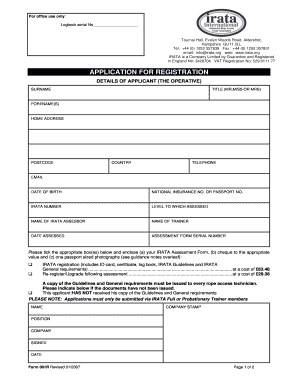
Get 001r Bapplicationb For Registrationpdf - Irata
How it works
-

Open form follow the instructions
-

Easily sign the form with your finger
-

Send filled & signed form or save
How to fill out the 001R Application for Registration - Irata online
Filling out the 001R Application for Registration form online is a straightforward process. This guide provides step-by-step instructions to help users complete the form accurately and efficiently.
Follow the steps to successfully complete your application.
- Click ‘Get Form’ button to obtain the form and open it in the editor.
- In the 'Details of Applicant (The Operative)' section, provide your surname, title, and forename(s). Ensure that you enter your full legal name as it appears on official documents.
- Next, complete your home address, including the postcode and country. Double-check to ensure accuracy, as this information is essential for communication.
- Enter your contact details, including telephone number and email. Ensure that the email is valid, as this may be used for correspondence regarding your application.
- Fill in your date of birth, and either your National Insurance number or Passport number. Providing complete and accurate identification details is crucial for registration.
- In the 'IRATA Information' section, if you have an existing IRATA number, include it along with the level to which you have been assessed, the name of the IRATA assessor, and the trainer’s name.
- Specify the date of your assessment and the serial number of your assessment form. This information is vital for verifying your eligibility.
- Tick the appropriate box(es) to indicate whether you are applying for registration or re-registration/upgrade. Include the required documents: your IRATA Assessment Form, a cheque for the application fee, and one passport-sized photograph attached securely to the form.
- In the 'Company Details' section, fill in your name, company stamp, position, and the company's name. Make sure a senior manager or director signs and dates the form.
- Review your completed form for any errors or omissions before submission. Ensure that all required documents are included.
- Once all information is accurate, save your changes, and download or print the form for your records. You may also share it as needed for submission.
Start completing your 001R Application for Registration online today!
Enter the IRATA Technicians surname and full IRATA number (digits after slash) to confirm the Level they are qualified to work as and the expiry date of their Certificate.