Loading
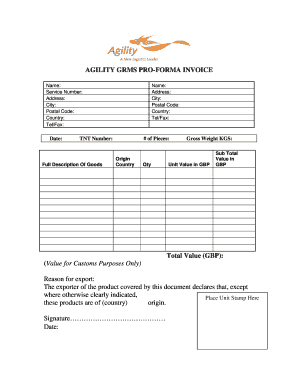
Get Agility Grms
How it works
-

Open form follow the instructions
-

Easily sign the form with your finger
-

Send filled & signed form or save
How to fill out the Agility Grms online
Filling out the Agility Grms online is a straightforward process that ensures your documentation is prepared accurately for shipping purposes. This guide will provide you with the necessary steps to complete the form effectively.
Follow the steps to complete your Agility Grms form online.
- Click the ‘Get Form’ button to access the Agility Grms document. This action will allow you to retrieve the form and open it in your preferred editor.
- Begin by entering your name in the designated field. This should reflect the person or organization sending the invoice.
- Next, input your service number. This is a unique identifier assigned to your services.
- Fill in your complete address, including the street name and number, in the corresponding fields.
- Indicate your city and postal code in the appropriate sections, followed by the country you are located in.
- Provide your telephone and fax numbers where specified to facilitate communication.
- Enter the date of the invoice in the space provided to record when the transaction is occurring.
- Repeat the procedure by entering the recipient's name, address details, city, postal code, country, and telephone/fax numbers.
- Fill in the TNT number, which is necessary for tracking the shipment.
- In the field for the full description of goods, provide a detailed account of what is being shipped.
- Indicate the number of pieces being sent in the specified section.
- Specify the country of origin for the goods listed.
- Enter the quantity of each item provided in the goods description.
- Document the gross weight in kilograms. This detail is essential for customs compliance.
- Provide the unit value in GBP for each item listed. This value should reflect the market price.
- Calculate and enter the subtotal value in GBP for the entire shipment.
- Indicate the total value (GBP) for customs purposes, ensuring that the amount is completed accurately.
- State the reason for export in the provided section to clarify the intent of the shipment.
- Make sure to declare the country of origin for the goods by filling in the appropriate space.
- Finally, provide your signature and the date on the designated lines to validate the document.
- Once everything is completed, save changes, and you can choose to download, print, or share the form as needed.
Start completing your Agility Grms online now to ensure seamless processing of your shipments.
Related links form
Integrity. Building trust with customers, communities, suppliers and one another by doing what is right, working safely, keeping our promises, being socially and environmentally responsible, complying with regulations and laws, and honoring rules of engagement.