Loading
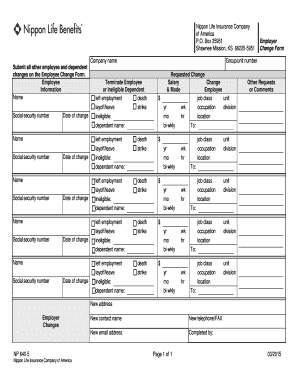
Get Nippon Termination & Change Form
How it works
-

Open form follow the instructions
-

Easily sign the form with your finger
-

Send filled & signed form or save
How to fill out the Nippon Termination & Change Form online
Filling out the Nippon Termination & Change Form online is a straightforward process. This guide will provide you with clear, step-by-step instructions to ensure all required information is accurately entered.
Follow the steps to complete the form effectively.
- Press the ‘Get Form’ button to access and open the Nippon Termination & Change Form in your preferred online format.
- Identify the Employee Information section. Enter the name and social security number of the employee undergoing changes. Be sure to include the date of the change for accurate record-keeping.
- In this section, list any additional employees or dependents affected by the change. Repeat the entry of name, social security number, and date of change for each individual.
- Move to the Employer Change Form section. Input the group/unit number to provide context for the changes being made.
- Select the appropriate reason for termination or ineligibility from the provided options: left employment, death, layoff/leave, strike, or ineligible dependent name. Make sure to detail any necessary information.
- Fill out the Requested Change section. For salary changes, specify the new salary along with the mode (e.g., yearly, monthly, bi-weekly), and outline job class, unit, occupation, and division if applicable.
- If there are additional requests or comments regarding the changes, document these in the provided space to ensure they are addressed.
- For Employer Changes, enter new address, contact name, telephone/FAX number, and email address as required to keep records up-to-date.
- Once all sections are completed, review the form for accuracy. After confirming all details are correct, you may save changes, download, print, or share the completed form as necessary.
Take action now by completing your documents online!
Related links form
In case Birla Sun Life succeeds in acquiring the 51 per cent stake in RNLIC, it will have to merge RNLIC with its existing insurance company -- Birla Sun Life Insurance -- due to the IRDA guidelines of no cross-holding being allowed between two insurance companies.