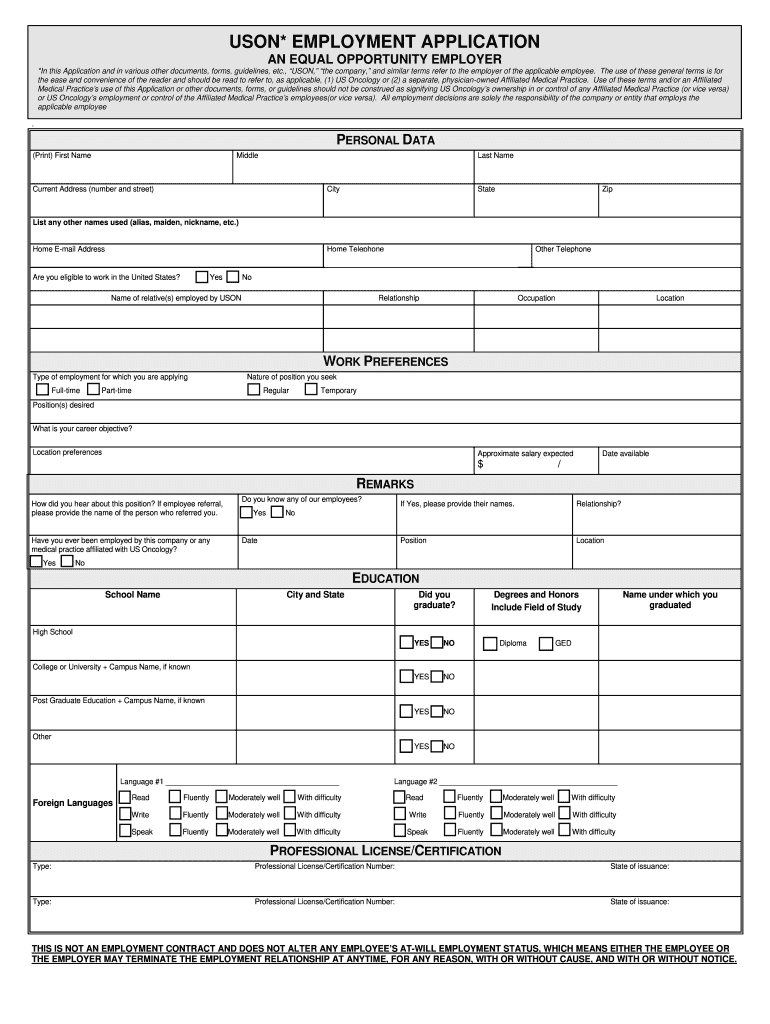
E employer of the applicable employee. The use of these general terms is for the ease and convenience of the reader and should be read to refer to, as applicable, (1) US Oncology or (2) a separate, physician-owned Affiliated Medical Practice. Use of these terms and/or an Affiliated Medical Practice’s use of this Application or other documents, forms, or guidelines should not be construed as signifying US Oncology’s ownership in or control of any Affiliated Medical Practice (or vice versa) or.

Open form follow the instructions

Easily sign the form with your finger

Send filled & signed form or save
How to fill out the USON Employment App online
Filling out the USON Employment Application online can be a straightforward process when you have a clear understanding of each section and field. This guide provides detailed instructions to help you navigate the application smoothly.
Follow the steps to complete your application online
- Press the ‘Get Form’ button to access the application and open it in your preferred online editor.
- Begin by entering your personal data in the designated fields. Include your first name, middle name, last name, current address, city, state, zip code, and any other names you have used.
- Provide your home email address and home telephone number. If applicable, include an additional telephone number and indicate your eligibility to work in the United States by selecting 'Yes' or 'No'.
- In the work preferences section, select the type of employment (full-time or part-time) and the nature of the position you seek (regular or temporary). Specify the positions desired, your career objective, location preferences, approximate salary expected, and your availability date.
- Fill out the education section by listing your school names, locations, and whether you graduated. Describe your degrees and honors, and include your name as it appears on your diploma.
- If applicable, provide details about any professional licenses or certifications. Include the type, number, and state of issuance.
- List any additional skills, noting any relevant qualifications. This can include special abilities, computer skills, or significant projects.
- For employment history, provide information about your two most recent employers over the past five years, including dates of employment, company names, positions held, ending salaries, and reasons for leaving.
- Complete the business references section by providing names, relationships, company names, and contact information.
- If required for the position you are applying for, fill out the driving record section with your driver's license type, number, and expiration date.
- Answer the applicant statements truthfully. If necessary, provide detailed explanations for any responses indicating 'Yes'.
- Finally, certify your application by signing and dating the form. Review your application for accuracy before submitting.
- Once completed, save your changes, and you may opt to download, print, or share the application as needed.
Complete your USON Employment Application online today for a smooth application experience.
Experience a faster way to fill out and sign forms on the web. Access the most extensive library of templates available.
Related content
Nov 9, 2024 — Solarz, Hon. Stephen J., member of the Joint Economic Committee...
by ER Fiedel · 2010 — Abstract. This thesis utilizes ideas taken from different Systems...
May 12, 2021 — Our Annual Report on Form 10-K, Quarterly Reports on Form 10-Q, Current...
Get answers to your most pressing questions about US Legal Forms API.
How to fill out usajobs profile?
To fill out your USAJOBS profile, begin by creating an account and navigating to the relevant sections like work experience and education. Using the USON Employment App can streamline this process by helping you organize your work history and achievements. Complete each section with clear, accurate information, and remember to update your profile regularly to reflect your most current qualifications.
How do I fill out an employment record?
Filling out an employment record for the USON Employment App requires you to be thorough and precise. Gather details about your previous jobs, including the company names, job titles, and dates of employment. Provide a brief description of your roles and responsibilities as they relate to your potential new position. This information showcases your career path effectively.
How to fill out an employment application?
To fill out an employment application effectively with the USON Employment App, start by following the instructions carefully. Fill out your personal information accurately, and provide specific job experiences and skills related to the position. Use clear, straightforward language to convey your qualifications, and check your application thoroughly before submission.
What are three things to avoid when filling out a job application?
When filling out a job application on the USON Employment App, avoid using unprofessional language, including irrelevant information, and neglecting to proofread your application. Each detail counts, so focus on presenting yourself positively and professionally. Additionally, be honest about your qualifications; exaggerating can lead to issues later.
How to fill an employment application?
Filling an employment application using the USON Employment App involves several key steps. Begin by gathering all necessary documents, such as your resume and references. As you fill out each section, ensure that the information is accurate and reflects your skills and experiences. Remember to review your application for any errors before submission, as small mistakes can affect your chances.
How do you write an application for beginners?
Writing an application for the USON Employment App starts with understanding the job requirements. Focus on your skills and experiences that relate directly to the position. Ensure you present your information clearly and concisely. Using templates from platforms like USLegalForms can also guide you in creating a professional-looking application.
How to search for jobs out of state?
Searching for jobs out of state can broaden your opportunities significantly. Use the USON Employment App to filter job postings based on location preferences. Ensure that your resume mentions your willingness to relocate while also addressing any potential employer concerns regarding your availability. Networking with professionals in your target state can also provide valuable insights and leads.
How do I get a job if I have no job?
If you are currently unemployed, focus on building your resume and highlighting transferable skills from past experiences. Leverage the USON Employment App to find positions that fit your profile and allow for growth. Consider volunteering or internships to gain experience and make connections in your desired industry. Remember, each application brings you closer to your next opportunity.
How do I get a job position?
Securing a job position typically involves applying for openings that match your qualifications. Utilize the USON Employment App to view various job listings and submit tailored applications. Attend interviews to showcase your skills and interest in the role. Following up with your potential employer can also demonstrate your enthusiasm and may set you apart from other candidates.
How do I find a work app?
To discover an effective work app, consider your working style and job requirements. The USON Employment App is highly recommended due to its user-friendly interface and comprehensive job listings. Check reviews and ratings to assess the app's credibility and features. Additionally, explore community forums or social media groups for recommendations from fellow job seekers.
Use professional pre-built templates to fill in and sign documents online faster. Get access to thousands of forms.
If you believe that this page should be taken down, please follow our DMCA take down process here.