Loading
Get Aviso Al Registro Estatal De Causantes
How it works
-

Open form follow the instructions
-

Easily sign the form with your finger
-

Send filled & signed form or save
How to fill out the Aviso Al Registro Estatal De Causantes online
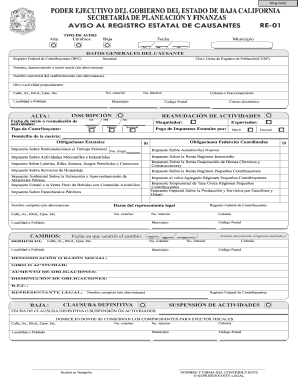
Filling out the Aviso Al Registro Estatal De Causantes is an essential process for those involved in business activities within Baja California. This guide provides step-by-step instructions for users to complete the form accurately and efficiently online.
Follow the steps to complete the form successfully.
- Click the ‘Get Form’ button to access the form and open it in the designated online editor.
- Select the type of notification you wish to file: Alta (new registration), Cambios (changes), or Baja (closure). Ensure this choice accurately reflects your current status.
- Fill in the date of the application by completing the day, month, and year fields.
- Provide the general data of the taxpayer, which includes the Registro Federal de Contribuyentes (RFC) and the Clave Unica de Registro de Población (CURP). Enter the full name, business name without abbreviations, and the predominant activity of your business.
- Complete the physical address of the business, including any necessary fields such as street name, exterior number, interior number, locality, and municipality.
- Indicate the type of taxpayer and, if applicable, provide details regarding the resumption of activities, including the start or resumption date of those activities.
- List the state tax obligations that pertain to your business. Check the relevant boxes beside the applicable taxes.
- If reporting changes, provide the date of the change, and fill out only the affected lines with the new details.
- For a closure notification, enter the date of the definitive closure or suspension of activities, along with the address where fiscal documents will be kept.
- Conclude by signing the form electronically using your full name as the taxpayer or legal representative. Ensure all information is correct before submission.
- After completing the form, you can save changes, download, print, or share the final document as needed.
Complete your documents online confidently and ensure compliance with state regulations.
Ingresa al Portal del SAT: .sat.gob.mx, en la opción Tramites del RFC selecciona Ver más, en seguida haz clic en la opción Inscripción al RFC y selecciona Realiza tu preinscripción en el RFC como persona física. Selecciona la opción Ejecutar en línea.