Loading
Get Teen Par-q Form.pdf - Live Borders
How it works
-

Open form follow the instructions
-

Easily sign the form with your finger
-

Send filled & signed form or save
How to fill out the Teen PAR-Q Form.pdf - Live Borders online
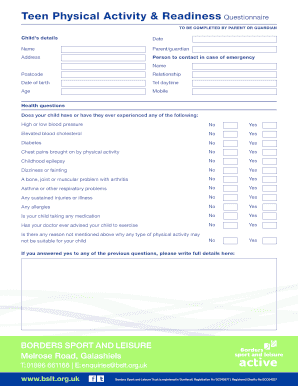
Completing the Teen Physical Activity & Readiness Questionnaire (PAR-Q) is an essential step for ensuring your child's readiness for physical activities. This guide will provide you with clear instructions on how to successfully fill out the form online, ensuring all necessary details are accurately recorded.
Follow the steps to complete the Teen PAR-Q Form online.
- Press the ‘Get Form’ button to access the Teen PAR-Q Form and open it in your document editor.
- Begin by entering your child’s details in the designated fields, including their full name, date of birth, and age.
- Fill in your details as the parent or guardian, including your name, address, and contact information.
- In the emergency contact section, provide the name, relationship, and phone number of a person to contact in case of an emergency.
- Answer the health questions regarding your child’s medical history. For each question, select ‘Yes’ or ‘No’ as appropriate.
- If you answer ‘Yes’ to any of the health questions, provide detailed information in the space provided.
- Read the formal declaration statement thoroughly. Sign and date the form, ensuring your signature is clear.
- Provide the printed name of the parent or guardian below the signature field.
- If applicable, ensure that the staff signature and printed name are filled in as well.
- Once you have completed the form, save your changes. You may choose to download, print, or share the document as necessary.
Complete your Teen PAR-Q Form online today to ensure your child’s safe participation in physical activities.
Related links form
The PAR-Q has been designed to identify the small number of adults for whom physical activity might be inappro- priate, or those who should have medical advice concerning the type of activity most suitable for them.