Loading
Get Homeschool Diploma
How it works
-

Open form follow the instructions
-

Easily sign the form with your finger
-

Send filled & signed form or save
How to fill out the Homeschool Diploma online
This guide provides a clear and supportive overview of how to complete the Homeschool Diploma online. By following these instructions step by step, you can ensure that all necessary information is accurately submitted.
Follow the steps to complete your Homeschool Diploma efficiently.
- Click ‘Get Form’ button to access the Homeschool Diploma form and open it in the designated editor.
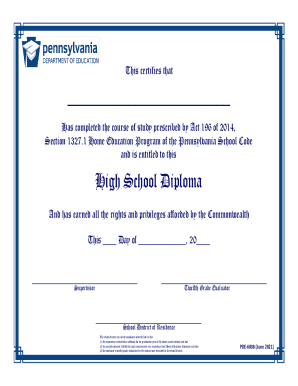
- Begin filling out the student's name in the designated field that certifies their completion of the course of study.
- Locate the date field where you will enter the current date of issuance for the diploma.
- Identify the 'Supervisor' area and input the name of the parent or guardian who has overseen the student's education.
- Next, find the 'Twelfth Grade Evaluator' section, and enter the name of the appointed evaluator, ensuring they meet all the necessary qualifications.
- Complete the 'School District of Residence' section by providing the name of the school district where the educational program was submitted for verification.
- Double-check all filled information for accuracy and completeness before finalizing.
- Save your changes, and you may choose to download, print, or share the completed form as needed.
Start completing your Homeschool Diploma online today for a smooth certification process.
Related links form
Is my homeschool student required to take the FSA or End-of-Course (EOC) Exams? Homeschooled students are not required to take any type of state assessment test. Some students may elect to take the FSA or EOC as part of their annual evaluation. Participation is optional.