Loading
Get Applicant/new Hire Adaaa Interactive Process Referral
How it works
-

Open form follow the instructions
-

Easily sign the form with your finger
-

Send filled & signed form or save
How to fill out the Applicant/New Hire ADAAA Interactive Process Referral online
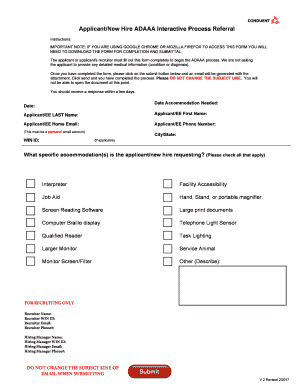
This guide provides detailed instructions on how to complete the Applicant/New Hire ADAAA Interactive Process Referral form online. By following these clear steps, users can efficiently navigate the form to request necessary accommodations.
Follow the steps to successfully complete the form.
- Press the ‘Get Form’ button to obtain the form. It will open in a downloadable format for your convenience.
- Enter the date on which the accommodation is needed in the designated field.
- Provide the applicant's last name in the 'Applicant/EE LAST Name' section.
- Fill in the applicant's first name in the 'Applicant/EE First Name' field.
- Input the applicant's personal home email address in the relevant section, ensuring it is a personal account.
- Include the applicant's phone number in the provided space.
- If applicable, enter the WIN ID of the applicant.
- Indicate the city and state, if applicable, in the specified fields.
- In the accommodations request section, check all applicable options for the accommodations needed by the applicant/new hire.
- If 'Other' is selected, provide a brief description of the requested accommodation in the space provided.
- For recruiting purposes, fill out the recruiter’s name, WIN ID, email, and phone number as well as the hiring manager's details.
- Once all fields are complete, click the submit button. An email will be generated with the form attached for submission. Do not change the subject line.
- You will not be able to open the document after submitting. Expect a response within a few days.
Begin filling out your accommodation request form online today.