Loading
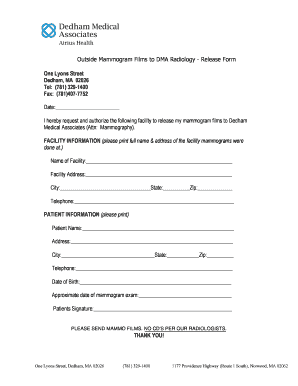
Get Outside Mammogram Films To Dma Radiology Release Form
How it works
-

Open form follow the instructions
-

Easily sign the form with your finger
-

Send filled & signed form or save
How to fill out the Outside Mammogram Films To DMA Radiology Release Form online
Filling out the Outside Mammogram Films To DMA Radiology Release Form online is a straightforward process. This guide will provide you with clear, step-by-step instructions to ensure that your request is accurately submitted.
Follow the steps to complete your form with ease.
- Click ‘Get Form’ button to obtain the form and open it in the editor.
- Begin by entering the date on the line provided at the top of the form.
- In the 'Facility Information' section, clearly print the full name and address of the facility where the mammograms were performed. Include the city, state, and zip code.
- Next, provide the facility's telephone number in the designated field.
- Move to the 'Patient Information' section. Here, print your name, address, city, state, and zip code.
- In the patient information section, also fill in your telephone number and date of birth.
- Indicate the approximate date of your mammogram exam in the provided space.
- Finally, sign your name in the designated area to authorize the release of your mammogram films.
- Once all sections are completed, you can save the changes, download, print, or share the form as needed.
Complete your Outside Mammogram Films To DMA Radiology Release Form online today.
Screen-film mammography remains an effective tool for detecting breast cancer.