Get Canada T183 E 2017
How it works
-

Open form follow the instructions
-

Easily sign the form with your finger
-

Send filled & signed form or save
How to fill out the Canada T183 E online
Filling out the Canada T183 E form online can streamline the process of managing your income tax and benefit return. This guide provides a clear, step-by-step approach to help you complete the form accurately.
Follow the steps to successfully complete your T183 E form.
- Click ‘Get Form’ button to obtain the Canada T183 E form and access it in the electronic editor.
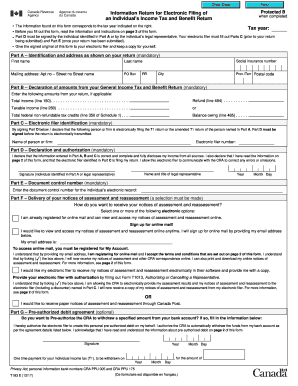
- In Part A, provide your identification and address details as shown on your return. This includes your first name, last name, street address, postal code, and social insurance number. Ensure this information is accurate, as it is mandatory.
- Move to Part B, where you will declare amounts from your General Income Tax and Benefit Return. Enter your total income, any refund, taxable income, total federal non-refundable tax credits, and balance owing as applicable.
- In Part C, identify your electronic filer. Enter the electronic filer number and the name of the person or firm responsible for filing your return.
- Proceed to Part D to make a declaration and authorization. Sign this part to confirm that the information entered is correct and that the electronic filer is authorized to submit your return.
- Enter the document control number in Part E, which is necessary for your electronic record.
- In Part F, select your preferences for receiving notices of assessment and reassessment. Choose between online mail, electronic options for your filer, or paper notices.
- If you wish to set up a pre-authorized debit agreement for automatic payments in Part G, fill out the required information including your signature and the details of the payment agreement.
- Review all entered information for accuracy. Once verified, you can save your changes, download, print, or share the completed form as necessary.
Start completing your Canada T183 E form online today and ensure you meet your tax filing requirements.
Get form
Filling the declaration form at a Canada airport requires you to provide information about your travel history, items you are bringing, and any specific declarations. Be honest and thorough when answering questions to avoid complications during your entry process. Be sure to check for any updates or requirements prior to arrival so that all information is up to date. Understanding the process is crucial for a smooth entry into Canada T183 E.