Loading
Get Logo Use Authorization Form - Abcfp - Abcfp
How it works
-

Open form follow the instructions
-

Easily sign the form with your finger
-

Send filled & signed form or save
How to fill out the Logo Use Authorization Form - ABCFP - Abcfp online
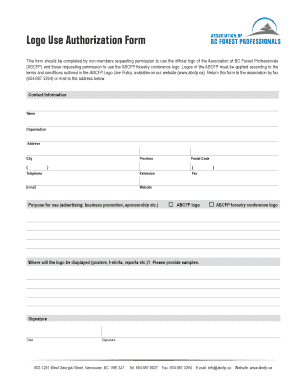
The Logo Use Authorization Form allows non-members to request permission to use the official logo of the Association of BC Forest Professionals (ABCFP). This guide provides clear, step-by-step instructions to help users complete the form online efficiently.
Follow the steps to fill out the Logo Use Authorization Form online.
- Click the ‘Get Form’ button to obtain the Logo Use Authorization Form and open it for editing.
- Fill in your contact information accurately. Include your name, organization, address, city, province, postal code, telephone number, extension, fax number, e-mail address, and website.
- Specify the purpose for which you intend to use the logo. This may include options such as advertising, business promotion, or sponsorship.
- Select the logo you wish to use: ABCFP logo or ABCFP forestry conference logo.
- Indicate where the logo will be displayed. This could include mediums such as posters, t-shirts, or reports. It is advisable to provide samples of the intended use.
- Sign the form in the designated area to confirm your request and agree to the terms and conditions.
- Include the date when the form is signed.
- Once all fields are completed, save your changes. You may then download, print, or share the form as necessary.
Start filling out your Logo Use Authorization Form online today!
Industry-leading security and compliance
US Legal Forms protects your data by complying with industry-specific security standards.
-
In businnes since 199725+ years providing professional legal documents.
-
Accredited businessGuarantees that a business meets BBB accreditation standards in the US and Canada.
-
Secured by BraintreeValidated Level 1 PCI DSS compliant payment gateway that accepts most major credit and debit card brands from across the globe.