Loading
Form preview
  • US Legal Forms
  • Other Templates
  • Other Forms
  • Florida Other Forms
  • Fl Permit Application - Cutler Bay

Get Fl Permit Application - Cutler Bay

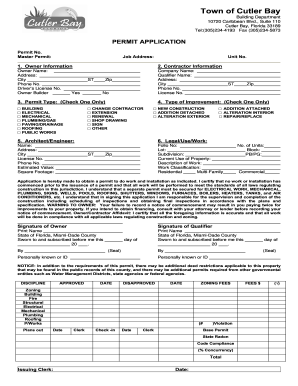
Nit No. 1. Owner Information 2. Contractor Information Owner Name: Address: City Phone No. Driver’s License No. Owner Builder Company Name: Qualifier Name: Address: City Phone No. License No. ST Yes Zip No 3. Permit Type: (Check One Only) □ □ □ □ □ □ □ BUILDING ELECTRICAL MECHANICAL PLUMBING/GAS PAVING/DRAINAGE ROOFING PUBLIC WORKS □ □ □ □ □ □ ST 4. Type of Improvement: (Check One Only) CHANGE CONTRACTOR EXTENSION RENEWAL SHOP DRAWING SIGN OTHER □ NEW.

How it works

  1. Open form

    Open form follow the instructions

  2. Easily sign form

    Easily sign the form with your finger

  3. Share form

    Send filled & signed form or save

How to fill out the FL Permit Application - Cutler Bay online

This guide provides clear instructions for completing the FL Permit Application for Cutler Bay online, ensuring a smooth application process. Whether you are a homeowner or a contractor, following these steps will help you navigate the form effectively.

Follow the steps to successfully complete your application

  1. Click ‘Get Form’ button to obtain the application and open it for editing.
  2. Begin by entering the permit number and the master permit number, if applicable, at the top of the form. If you are a contractor, fill in the job address and the unit number.
  3. In the owner information section, provide the owner’s name, address, city, phone number, and driver's license number. If the owner is acting as their own builder, check the corresponding box.
  4. In the contractor information section, enter the company name, qualifier's name, address, city, phone number, and license number.
  5. Select the type of permit required by checking only one option under the permit type section, which includes various categories such as building, electrical, mechanical, plumbing/gas, paving/drainage, roofing, and public works.
  6. In the type of improvement section, mark only one box to indicate the nature of the improvement, such as new construction, addition, alteration, or repair.
  7. Provide the architect or engineer's information, including their name, address, city, license number, and phone number.
  8. Complete the legal/use/work section by filling out fields related to the estimated value, square footage, folio number, lot, subdivision, current use of property, a description of the work, and work classification (residential or commercial).
  9. Review the certification section carefully. This section includes an affidavit confirming that all information is accurate and that the work will be done in compliance with all applicable laws.
  10. Sign the application where indicated, both for the owner and for the qualifier, ensuring the printed names are also included.
  11. Once all sections are completed, save your changes. You can then download, print, or share the completed form as needed.

Complete your application online today to ensure a streamlined permit process.

Get form

Experience a faster way to fill out and sign forms on the web. Access the most extensive library of templates available.
Get form

Related content

Forms, Permits, and Applications | Town of Cutler...
Forms, Permits, and Applications · Permit Application Form · Permit Application Form...
Learn more
Building Permit Activity in Florida
This release is based on voluntary reports from local building permit officials processed...
Learn more
Xfinity Home Security: Florida Municipal Alarm...
Current Cost: $10.00 Fee. Alarm Permit Application: Permit application must be obtained in...
Learn more

Related links form

Wniosek O Dowód Osobisty Pdf Assmang Iron Ore Khumani Mine Online Auction South Africa Sale 13 Horizontal Collaboration In Fresh & Chilled Retail Distribution - Babm - Babm 5 Sentences About Family

Questions & Answers

Get answers to your most pressing questions about US Legal Forms API.

Contact support

In Florida, certain minor improvements may not require a permit, such as small sheds, fences under a specific height, and simple landscaping changes. However, regulations vary by locality, making it important to check with your local building department. Always prioritize submitting a FL Permit Application - Cutler Bay when in doubt, to ensure compliance.

The timeframe for getting a building permit approved in Florida varies by county, typically ranging from a few weeks to several months. Factors such as the complexity of your project and the volume of applications can influence this time. To navigate the permitting process efficiently, consider using resources that guide you through your FL Permit Application - Cutler Bay.

If you construct a building without a permit in Florida, you risk facing legal complications. Local officials may issue a stop-work order and require changes to bring your project into compliance. This could also affect your property's marketability because unpermitted work may need to be rectified before selling. Therefore, a timely FL Permit Application - Cutler Bay is critical.

In Florida, building without a permit can lead to significant fines and penalties. The exact amount varies depending on the jurisdiction, but fines can reach thousands of dollars. Additionally, you may be required to obtain retroactive permits, which can complicate the process. To avoid these issues, submitting your FL Permit Application - Cutler Bay is essential.

As mentioned earlier, the approval timeline for building permits can differ based on several factors. Typically, you might expect a timeframe from two weeks to several months. To avoid delays, your best bet is to utilize the FL Permit Application - Cutler Bay. It offers a structured approach that can expedite the process.

While the process of obtaining a building permit in Florida can seem daunting, it becomes manageable with proper guidance. Local regulations may add complexity, but using resources like the FL Permit Application - Cutler Bay increases your chances of success. By following clear guidelines and having the right information, you can simplify your experience.

In most cases, you can build a structure no larger than 120 square feet without applying for an FL Permit Application - Cutler Bay. This includes items like small sheds and playhouses. However, local regulations may vary, so it's crucial to check with your municipality. Consulting uslegalforms can help you understand the specific requirements for your area.

Selling a house with unpermitted work in Florida can be challenging. Many buyers will hesitate or request significant discounts due to potential risks associated with unpermitted renovations. You can navigate this situation more easily by obtaining a proper permit through the FL Permit Application - Cutler Bay, ensuring that all work complies with local standards.

The permitting process involves several steps, including application submission, document review, and inspections. First, you fill out the FL Permit Application - Cutler Bay, then local officials review your plans to ensure compliance with building codes and zoning laws. Once reviewed, an inspection may be conducted before you can start your construction.

Section 105.1 of the Florida Building Code states that a permit is required to construct, enlarge, alter, repair, move, demolish or change the occupancy or occupant content of a building or structure or to erect, , enlarge, alter, repair, remove, convert or replace any electrical, gas, mechanical or plumbing ...

Get This Form Now!

Use professional pre-built templates to fill in and sign documents online faster. Get access to thousands of forms.
Get form
If you believe that this page should be taken down, please follow our DMCA take down processhere.
Get FL Permit Application - Cutler Bay
Get form
  • Adoption
  • Bankruptcy
  • Contractors
  • Divorce
  • Home Sales
  • Employment
  • Identity Theft
  • Incorporation
  • Landlord Tenant
  • Living Trust
  • Name Change
  • Personal Planning
  • Small Business
  • Wills & Estates
  • Packages A-Z
  • Affidavits
  • Bankruptcy
  • Bill of Sale
  • Corporate - LLC
  • Divorce
  • Employment
  • Identity Theft
  • Internet Technology
  • Landlord Tenant
  • Living Wills
  • Name Change
  • Power of Attorney
  • Real Estate
  • Small Estates
  • Wills
  • All Forms
  • Forms A-Z
  • Other Templates
  • Legal Hub
  • About Us
  • Help Portal
  • Legal Resources
  • Blog
  • Affiliates
  • Contact Us
  • Delete My Account
  • Site Map
  • Industries
  • Forms in Spanish
  • Localized Forms
  • State-specific Forms
  • Forms Kit
  • Real Estate Handbook
  • All Guides
  • Notarize
  • Incorporation services
  • For Consumers
  • For Small Business
  • For Attorneys
  • USLegal
  • FormsPass
  • pdfFiller
  • signNow
  • altaFlow
  • DocHub
  • Instapage
Form Packages
  • Adoption
  • Bankruptcy
  • Contractors
  • Divorce
  • Home Sales
  • Employment
  • Identity Theft
  • Incorporation
  • Landlord Tenant
  • Living Trust
  • Name Change
  • Personal Planning
  • Small Business
  • Wills & Estates
  • Packages A-Z
Form Categories
  • Affidavits
  • Bankruptcy
  • Bill of Sale
  • Corporate - LLC
  • Divorce
  • Employment
  • Identity Theft
  • Internet Technology
  • Landlord Tenant
  • Living Wills
  • Name Change
  • Power of Attorney
  • Real Estate
  • Small Estates
  • Wills
  • All Forms
  • Forms A-Z
  • Other Templates
Customer Service
  • Legal Hub
  • About Us
  • Help Portal
  • Legal Resources
  • Blog
  • Affiliates
  • Contact Us
  • Delete My Account
  • Site Map
  • Industries
  • Forms in Spanish
  • Localized Forms
  • State-specific Forms
  • Forms Kit
Legal Guides
  • Real Estate Handbook
  • All Guides
Prepared for you
  • Notarize
  • Incorporation services
Our Customers
  • For Consumers
  • For Small Business
  • For Attorneys
Our Sites
  • USLegal
  • FormsPass
  • pdfFiller
  • signNow
  • altaFlow
  • DocHub
  • Instapage
Social Media
Call us now toll free:
+1 833 426 79 33
As seen in:
© Copyright 1999-2026 airSlate Legal Forms, Inc. 17 Station Street, Suite 303, Brookline, MA 02445
  • Your Privacy Choices
  • Terms of Service
  • Privacy Notice
  • Content Takedown Policy
  • Bug Bounty Program