Loading
Get Warehouse Release Form
How it works
-

Open form follow the instructions
-

Easily sign the form with your finger
-

Send filled & signed form or save
How to fill out the Warehouse Release Form online
Filling out the Warehouse Release Form online can simplify the process of releasing goods from storage. This guide provides clear, step-by-step instructions to assist users in completing the form accurately and efficiently.
Follow the steps to fill out the Warehouse Release Form online.
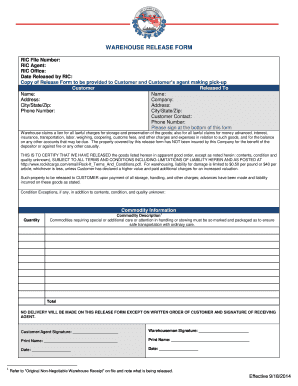
- Click the ‘Get Form’ button to access the Warehouse Release Form and open it in a digital editor.
- Begin by entering the RIC file number in the designated field at the top of the form. This number is essential for tracking the specifics of the release.
- Complete the fields for the RIC agent and RIC office, providing the necessary contact information for reference.
- Fill in the date when the goods are released by the RIC. This informs all parties of the release timeline.
- In the Customer section, provide the name of the person or organization picking up the goods, along with their address, including city, state, and zip code.
- Enter the contact phone number for the customer, ensuring they can be reached during the pickup process.
- List the details of the goods being released, specifying quantity and a brief description of each item. This ensures clarity on what is included in the release.
- If there are any condition exceptions (e.g., damages or irregularities), note them in the provided space to prevent misunderstandings.
- Both the customer/agent and warehouseman must sign the form at the bottom. Each must print their name and include the date of signing.
- After completing all sections, you can save your changes, download the form for your records, print it for physical submission, or share it as required.
Complete your Warehouse Release Form online today for a smooth and organized release process.
The essential elements of a model release form Your name and business name. Your business address. A release of all claims against your company. Whether you want to release claims from other companies that buy, use, or obtain the licenses for your photos.