Loading
Get Panera Boxed Lunch Order Form - Virginia Peninsula Chamber
How it works
-

Open form follow the instructions
-

Easily sign the form with your finger
-

Send filled & signed form or save
How to fill out the Panera Boxed Lunch Order Form - Virginia Peninsula Chamber online
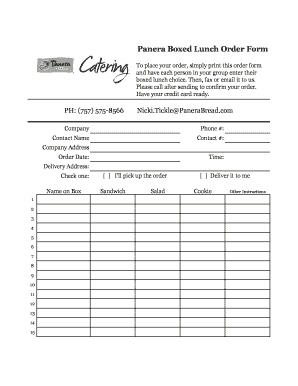
This guide will assist you in completing the Panera Boxed Lunch Order Form for the Virginia Peninsula Chamber online. By following these steps, you can ensure a smooth ordering process for your boxed lunches.
Follow the steps to complete your boxed lunch order form online.
- Press the ‘Get Form’ button to access the order form and open it in your chosen editor.
- Enter your company name in the designated field.
- Provide your phone number for contact purposes.
- Fill in the contact person's name. This should be an individual who can discuss the order.
- Record the contact person's phone number for follow-up.
- Input your company address for delivery.
- Specify the order date to indicate when you need the lunch.
- Indicate the time for the delivery or pickup.
- Complete the delivery address if you select delivery; otherwise, leave it blank.
- Choose the preferred method of receiving your order by checking either 'I'll pick up the order' or 'Deliver it to me'.
- Select the sandwich or salad options for each person in your group, specifying their choices.
- Indicate any additional items or instructions in the 'Other Instructions' section.
- Sign the form to confirm your approval of the order.
- Review the completed form to ensure all necessary fields are filled out.
- Save your changes, then you can download, print, or share the order form as needed.
Start your order today by completing the Panera Boxed Lunch Order Form online!