Loading
Get 0938-0025 (expires: Tbd)
How it works
-

Open form follow the instructions
-

Easily sign the form with your finger
-

Send filled & signed form or save
How to fill out the 0938-0025 (Expires: TBD) online
Completing the 0938-0025 form is essential for users who wish to voluntarily request termination of their Medicare coverage. This guide will walk you through each section of the form, providing clear instructions to ensure you can fill it out accurately and efficiently.
Follow the steps to complete the 0938-0025 form online
- Press the 'Get Form' button to access the document and open it in the designated online editor.
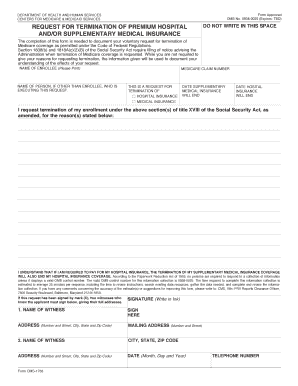
- Enter the name of the enrollee in the provided field. Ensure that this is clearly printed to avoid any confusion.
- If someone other than the enrollee is executing this request, fill in their name in the corresponding field.
- Input the Medicare claim number in the space designated for identification. It is crucial for processing your request.
- Indicate whether this request pertains to hospital insurance, medical insurance, or both by checking the appropriate boxes.
- Specify the date on which the supplementary medical insurance will end. This ensures clarity in your request regarding termination dates.
- Similarly, provide the end date for the hospital insurance coverage in the designated field.
- Include your reason for terminating the insurance, if you choose to provide one. This section is optional.
- Review the statement regarding the understanding of the effects of termination, ensuring you agree with its contents.
- Sign the document in ink. If signed by mark (X), ensure two witnesses who know you also sign below with their complete addresses.
- Complete the witness signature fields, including their names and addresses, confirming their presence during the signing process.
- Finally, save your changes, download, print, or share the form as needed to complete your submission.
Ensure your documents are completed accurately and submit your request online today.
2. By regular mail. You may mail written comments to the following address: CMS, Office of Strategic Operations and Regulatory Affairs, Division of Regulations Development, Attention: Document Identifier/OMB Control Number ___, Room C4–26–05, 7500 Security Boulevard, Baltimore, Maryland 21244–1850.