Loading
Get Download Warranty Claim Form
How it works
-

Open form follow the instructions
-

Easily sign the form with your finger
-

Send filled & signed form or save
How to fill out the Download Warranty Claim Form online
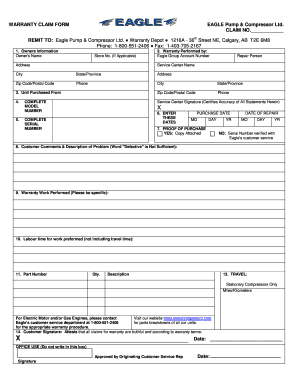
Filling out the Download Warranty Claim Form online is a straightforward process that ensures your warranty claim is processed efficiently. This guide provides clear, step-by-step instructions to help you complete the form accurately.
Follow the steps to fill out the warranty claim form effectively.
- Click the ‘Get Form’ button to download the warranty claim form and open it for editing.
- Begin by entering your owner's information. Provide your name, store number (if applicable), and your complete address.
- In the warranty performed by section, input the Eagle Group account number, name of the repair person, service center name, along with the city and state/province where the service was conducted. Don’t forget to include the service center's address and contact number.
- Indicate where you purchased the unit. Fill in the store's address, including the city, state/province, zip code/postal code, and phone number.
- In the unit details section, enter the complete model number and complete serial number of the unit, as well as the purchase date, including month, day, and year.
- Attach proof of purchase. If you have a copy, mark ‘Yes’ and attach it. If not, indicate 'No' and provide the confirmation of the serial number from Eagle's customer service.
- Use the customer comments field to provide a detailed description of the problem, avoiding just labeling it as ‘defective’.
- Describe the warranty work performed in detail, specifying the nature of the repairs conducted.
- Indicate the labor time for the work performed, excluding any travel time.
- List the part numbers, quantities, and descriptions for each part involved in the repair.
- If applicable for stationary compressors, enter the travel distance in miles or kilometers.
- Sign and date the form as the customer, confirming that all claims are truthful and meet warranty terms.
- Finally, save your changes, and you may download, print, or share the completed form as needed.
Begin completing your warranty claim form online today to ensure a smooth processing experience.
In compliance with your warranty, I request that you "repair without charge" the above-mentioned defective part. Your limited one-year warranty entitles me to a free replacement or repair because the defect is obviously due to poor workmanship. I request repair of the defects covered under the full 30-day warranty.