Loading

Open form follow the instructions

Easily sign the form with your finger

Send filled & signed form or save
How to fill out the Nanny Evaluation Form online
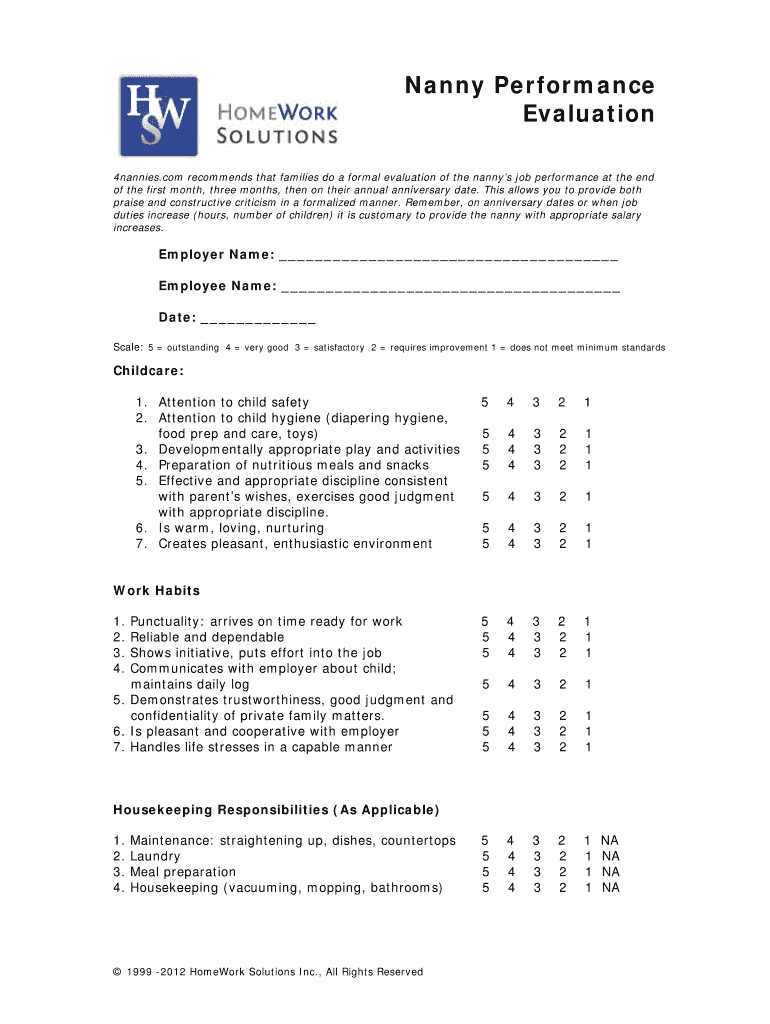
Filling out the Nanny Evaluation Form is an important step in assessing the performance of your nanny. This guide provides detailed instructions for completing the form online in a clear and user-friendly manner.
Follow the steps to complete the Nanny Evaluation Form online.
- Click ‘Get Form’ button to access the Nanny Evaluation Form and open it in your selected online editor.
- Begin by entering the employer name and employee name in the designated fields to identify both parties clearly.
- Fill in the date of the evaluation to provide context for the assessment.
- Using the provided scale from 1 to 5, evaluate the nanny’s childcare performance in areas such as attention to child safety, hygiene, and developmentally appropriate activities. Check the box corresponding to your assessment for each item.
- Continue with the work habits section, assessing punctuality, reliability, initiative, communication, trustworthiness, and how the nanny handles stress. Again, use the 1 to 5 scale to indicate your evaluation for each criterion.
- For any housekeeping responsibilities applicable to the nanny’s role, complete this section using the same 1 to 5 scale to indicate their performance.
- In the areas of excellence section, list specific strengths exhibited by the nanny, and feel free to attach additional pages if necessary.
- Provide suggestions for improvements in the designated section, and attach additional pages if required.
- Sign and date the form in the employer signature section, and allow the employee to add their comments and signature at the end.
- Once all sections are completed, save your changes, and choose to download, print, or share the form as needed.
Complete the Nanny Evaluation Form online today to ensure a thorough and constructive assessment of your nanny's performance.
Experience a faster way to fill out and sign forms on the web. Access the most extensive library of templates available.
Related content
Jan 17, 2014 — CHAPTER 6 EDUCATIONAL EVALUATION/FORMAL ASSESSMENT FOR DYSLEXIA ....
Get answers to your most pressing questions about US Legal Forms API.
How do you evaluate a nanny?
6 criteria to evaluate when hiring a nanny Interest in working with children. ... Safety certifications and child care training. ... Special needs training. ... Caregiving philosophies. ... Ability to take on additional household responsibilities. ... Personality similarities and differences.
What is a nanny performance review?
A nanny performance review is a time to discuss goals, personal job growth, areas of improvement, and what you can do to help them succeed in their role. Performance reviews are fairly standard in traditional work environments and your nanny can benefit from one too.
How do you write a review for a nanny?
Take the following steps to write a recommendation letter for a nanny that highlights their skills and personality and helps them get hired: Choose a formal template. ... Write a salutation. ... Introduce the facts. ... Focus on strengths. ... Add personal details. ... Tell a story. ... List special skills. ... Explain why employment ended.
How do you evaluate a babysitter?
What to look for during the babysitter trial run Personality. By the time a babysitter has made it to the trial period, they've already impressed you with their skills, qualifications and personality during the interview. ... Ability to follow instructions. ... Communication.
What is a good quality of a nanny?
Strengths: Top Qualities Of A Good Nanny They know how to manage different situations. They have unconditional love for children. Nannies are flexible with their time. Nannies are trustworthy individuals.
What are the values of a nanny?
A few of the most common values that parents want nannies to instill in their children are honesty, fairness, friendship, respect, and compassion.
How do I fill out an evaluation form?
How to Fill Out an Employee Evaluation Form Step 1: Gather Employee Information. ... Step 2: Assess Employee Responsibilities and Performance. ... Step 3: Use Objective Language. ... Step 4: Use Action Verbs. ... Step 5: Compare Performance Ratings. ... Step 6: Ask Open-Ended Questions. ... Step 7: Use a Point System.
Use professional pre-built templates to fill in and sign documents online faster. Get access to thousands of forms.
If you believe that this page should be taken down, please follow our DMCA take down process here.