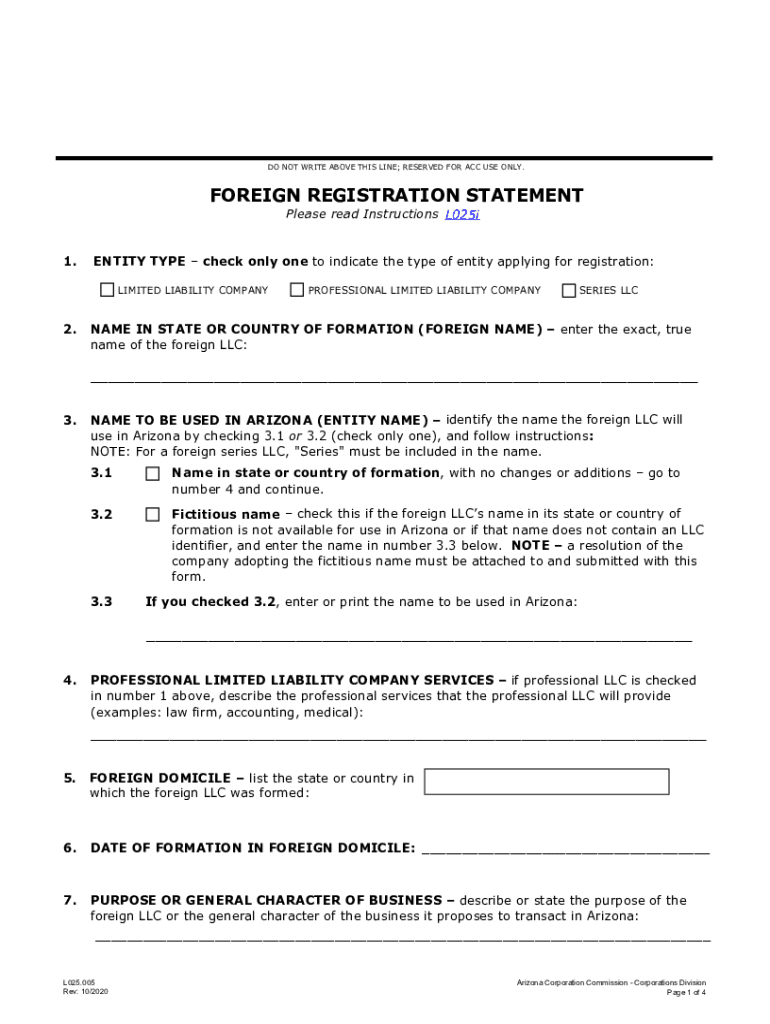
Print Formulae Form DO NOT WRITE ABOVE THIS LINE; RESERVED FOR ACC USE ONLY.FOREIGN REGISTRATION STATEMENT Please read Instructions L025i1.ENTITY TYPE check only one to indicate the type of entity.
Loading

Open form follow the instructions

Easily sign the form with your finger

Send filled & signed form or save
How to fill out the PDF Foreign Registration Statement - Arizona Corporation Commission online
Filling out the PDF Foreign Registration Statement is an essential step for entities seeking to operate in Arizona. This guide provides clear and detailed instructions to assist you in completing the form accurately and efficiently.
Follow the steps to successfully complete the form.
- Press the ‘Get Form’ button to obtain the form and open it in your PDF editor.
- Identify the entity type by checking only one option in the first section: Limited Liability Company, Professional Limited Liability Company, or Series LLC.
- Enter the exact name of the entity as it appears in the state or country of formation in the specified field.
- Select the name to be used in Arizona. Check option 3.1 if using the same name or option 3.2 for a fictitious name, and provide additional details if applicable.
- If a Professional Limited Liability Company is selected, describe the professional services to be provided.
- List the state or country where the foreign LLC was formed.
- Enter the date of formation for the foreign entity.
- Describe the purpose of the foreign LLC or the business activities it will conduct in Arizona.
- Provide the name and physical address of the statutory agent in Arizona.
- Complete the mailing address section for the foreign LLC if applicable.
- Indicate if the jurisdiction of formation requires the LLC to maintain a street address, and fill in the necessary details.
- Provide information about the designating foreign company if applicable.
- Choose between Manager-Managed LLC or Member-Managed LLC and complete the required attachment.
- Review the acknowledgment section before signing. Check the box, enter your printed name, and date and provide authorization details.
Complete your Foreign Registration Statement online to ensure your business is properly registered in Arizona.
Experience a faster way to fill out and sign forms on the web. Access the most extensive library of templates available.
Related content
FOREIGN REGISTRATION STATEMENT. L025i. 1. Please read Instructions. ENTITY TYPE – check...
Feb 17, 2018 — Form 8868, Application for Extension of Time To File an Exempt...
Use professional pre-built templates to fill in and sign documents online faster. Get access to thousands of forms.
If you believe that this page should be taken down, please follow our DMCA take down process here.
This form is available in several versions. Select the version you need from the drop-down list below.