Loading
Get Genesys Si
How it works
-

Open form follow the instructions
-

Easily sign the form with your finger
-

Send filled & signed form or save
How to fill out the Genesys Si online
This guide provides a comprehensive overview of the Genesys Si document, helping users navigate and fill out the form online efficiently. Each section is explained to ensure clarity and ease of understanding for everyone, regardless of their legal background.
Follow the steps to complete the form accurately.
- Press the ‘Get Form’ button to access the Genesys Si document. This action will allow you to retrieve and view the form in an online format.
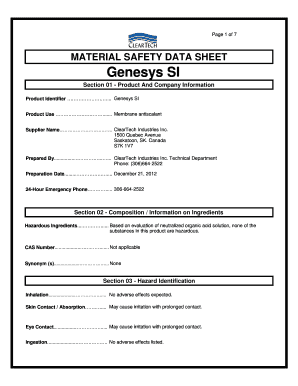
- Begin by completing Section 01, which requires basic product and company information. Input the product identifier, which is 'Genesys Si', and provide details about the supplier, including the name and address.
- Next, move to Section 02. Here, confirm the composition of the product. Since no substances are considered hazardous, simply state that based on the product evaluation, none of the ingredients are hazardous.
- Continue to Section 03, which addresses hazard identification. You can indicate that no adverse effects are expected from inhalation and that skin or eye contact may cause irritation.
- In Section 04, outline first aid measures. Provide information on how to respond to inhalation, skin contact, eye contact, and ingestion of the product.
- Section 05 covers fire fighting measures. State that the product is aqueous-based and not applicable for flammability. Describe the extinguishing media that could be utilized.
- Proceed to Section 06 for accidental release measures. Outline the procedures to mitigate spills, including wearing appropriate personal protective equipment and ventilating the area.
- Fill out Section 07 regarding handling and storage. Make recommendations about proper handling procedures and storage requirements to ensure safety.
- In Section 08, specify personal protection and exposure controls. Enumerate the protective equipment needed, such as chemical goggles and gloves, as well as any ventilation requirements.
- Complete Section 09, which involves detailing the physical and chemical properties of the product. Fill out fields such as state, odor, specific gravity, and pH.
- In Section 10, confirm the stability and reactivity of the product, noting that it is stable and no hazardous substances are present.
- Section 11 requires you to provide toxicological information, indicating irritancy and any chronic effects, while noting the absence of adverse reports.
- Fill out Section 12 regarding ecological information by confirming that the product does not pose dangers to the environment.
- Complete Section 13, providing waste disposal guidelines in accordance with all applicable regulations.
- In Section 14, outline transport information to ensure safety during shipping, confirming that the product is not regulated.
- Review Section 15 for regulatory information and ensure that all classifications are appropriately noted.
- Finish by finalizing Section 16. Highlight the importance of a safe workplace and provide contact information for further inquiries.
- Once all sections are completed and reviewed, save any changes made, and choose to download, print, or share the form as needed.
Complete and submit your Genesys Si document online today to ensure compliance and safety.
The Genesys Cloud CX platform has a minimum commitment of $2,000 per month.
Industry-leading security and compliance
US Legal Forms protects your data by complying with industry-specific security standards.
-
In businnes since 199725+ years providing professional legal documents.
-
Accredited businessGuarantees that a business meets BBB accreditation standards in the US and Canada.
-
Secured by BraintreeValidated Level 1 PCI DSS compliant payment gateway that accepts most major credit and debit card brands from across the globe.