Loading
Get Offshore Medical Certificate
How it works
-

Open form follow the instructions
-

Easily sign the form with your finger
-

Send filled & signed form or save
How to fill out the Offshore Medical Certificate online
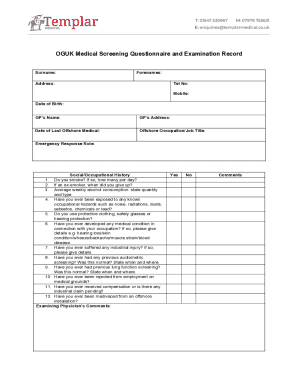
The Offshore Medical Certificate is an essential document for individuals undertaking offshore job assignments. This guide will provide you with clear, step-by-step instructions on how to fill out the form online, ensuring you meet all necessary requirements.
Follow the steps to complete your Offshore Medical Certificate online.
- Click ‘Get Form’ button to obtain the Offshore Medical Certificate and open it in your preferred editor.
- Begin by entering your full name in the designated field. Ensure that the spelling matches your identification documents.
- In the next field, provide your Employee ID or SOS number. This is crucial for identification purposes.
- Enter your date of birth in the format requested. Double-check for accuracy to avoid complications.
- Specify your position or title within the company in the corresponding section. This helps to clarify your role related to the medical examination.
- Fill in your EcCare Account number if applicable. This information is often used for record-keeping.
- Review all information entered for any mistakes. It is vital that all details are correct to avoid delays.
- The Certification Statement section will be automatically filled by the examining physician after your examination.
- Once all information is double-checked, save your changes. You can then download, print, or share the completed Offshore Medical Certificate as needed.
Ensure your Offshore Medical Certificate is ready by completing the document online today.
Related links form
OGUK medical providers in London OGUK Medical ProviderAddressPhoneFleet Street ClinicFleet Street Clinic 29 Fleet Street, London, EC4Y 1AA020 7353 5678Knightsbridge Doctors15 Basil Mansions Basil Street London SW3 1AP020 7584 6718Doctorcall Ltd65 London Wall, London, EC2M 5TU 121 Harley Street, London W1G 6AX034425703452 more rows • 28 Jul 2021