Loading
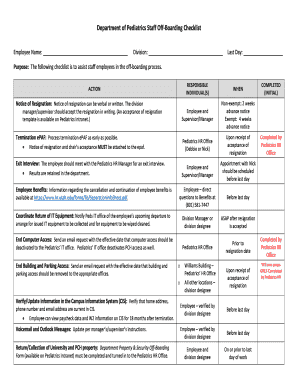
Get Employee Offboarding In 7 Steps +free Offboarding Checklist
How it works
-

Open form follow the instructions
-

Easily sign the form with your finger
-

Send filled & signed form or save
How to fill out the Employee Offboarding In 7 Steps + Free Offboarding Checklist online
Effectively managing the offboarding process is essential for any organization. This guide will walk you through the steps necessary to complete the Employee Offboarding In 7 Steps + Free Offboarding Checklist online, ensuring a smooth transition for both the employee and the organization.
Follow the steps to complete the Employee Offboarding Checklist successfully.
- Press the ‘Get Form’ button to access the Employee Offboarding Checklist and open it in your preferred online form editor.
- Fill out the employee name, division, and last day on the checklist. Ensure that this information is accurate, as it will be used in various capacity during the offboarding process.
- Identify the responsible individuals for each action item in the checklist. Make sure to communicate with the designated individuals to confirm their roles in the offboarding process.
- Schedule an appointment with the Pediatrics HR office. This must be done before the employee's last day and is critical for the exit interview and completion of paperwork.
- Initiate cancellation or continuation of employee benefits. Before the last day, the employee should directly reach out to the Benefits office with any questions.
- Coordinate the return of IT equipment. Notify the Peds IT office about the departure as soon as the resignation is accepted to arrange for equipment collection and data wiping.
- Finalize the checklist by ensuring that all tasks have been completed. This includes confirming building access removal, updating the Campus Information System, and completing the Department Property & Security Off-Boarding Form. Save changes, download, print, or share the checklist as needed.
Complete your Employee Offboarding process online today!
Related links form
The employee will need to return any company-issued resources (such as a laptop or mobile phone), hand in their ID badge, and clear their desk. HR will also have to handle all the necessary paperwork (such as benefits documentation, signed resignation, NDA agreements, etc.)