Loading
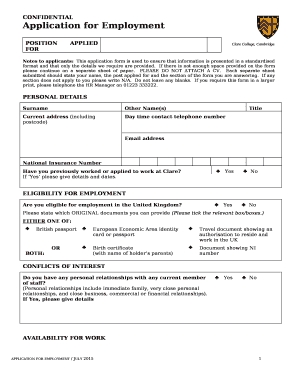
Get Pdf Form Not Enough Space
How it works
-

Open form follow the instructions
-

Easily sign the form with your finger
-

Send filled & signed form or save
How to fill out the Pdf Form Not Enough Space online
This guide provides comprehensive instructions on filling out the Pdf Form Not Enough Space. It is designed to assist users in effectively completing the application while ensuring all necessary information is conveyed.
Follow the steps to successfully complete your application form.
- Press the ‘Get Form’ button to obtain the form and open it in the editor of your choice.
- Begin with the personal details section. Accurately enter your surname, other names, title, current address including postcode, daytime contact number, email address, and National Insurance number. If any fields do not apply to you, indicate this with 'N/A' rather than leaving them blank.
- In the eligibility for employment section, select 'Yes' or 'No' to indicate your eligibility to work in the United Kingdom. Provide information for the original documents you can present to demonstrate your eligibility.
- Complete the conflicts of interest section by noting any personal relationships with current staff. Mark ‘Yes’ or ‘No’ and provide details if applicable.
- Fill out the availability for work section, detailing any existing holiday commitments that may affect your start date.
- In the current employer section, provide the name and address of your employer, your job title, notice period, start and end dates, reason for leaving, current salary, main duties, and significant achievements.
- List each previous employment position you have held, starting with the most recent. Include necessary details such as employer name and address, job title, dates, reason for leaving, duties, and achievements. Continue on a separate sheet if necessary.
- Complete the other employment section, mentioning any jobs you intend to continue alongside the new position.
- In the reason for applying section, describe your motivation for applying and why you believe you are a suitable candidate. Use additional sheets if needed.
- Detail any further achievements in the achievements section, explaining how they demonstrate your skills for the role.
- Provide information regarding your education and qualifications, including GCSEs, A-levels, and degrees. Be prepared to present evidence if shortlisted for an interview.
- List your IT skills and specify your level of expertise in each software package.
- Include details of any training courses you have attended and any professional body memberships you hold.
- Complete the references section with the details of two referees. Ensure one is your current employer and that they consent to provide references.
- Review the applicant declaration and data consent section carefully, marking your agreement to the statements provided before signing and dating.
- Finally, save your changes, download the completed form, or print it as necessary before submitting it via the specified email or postal address.
Complete your application form online to enhance your job application experience.
Get form
Experience a faster way to fill out and sign forms on the web. Access the most extensive library of templates available.
Related links form
The blank PDF file may occur if the Adobe Acrobat Reader plug-ins are missing. Incompatible program or older versions. A bad internet connection or an improperly downloaded large file. Improper file closing, such as an abrupt shutdown, might result in a empty PDF being saved.
Get This Form Now!
Use professional pre-built templates to fill in and sign documents online faster. Get access to thousands of forms.