Loading
Get Prc Renewal
How it works
-

Open form follow the instructions
-

Easily sign the form with your finger
-

Send filled & signed form or save
How to fill out the Prc Renewal online
Renewing your professional identification card is essential for maintaining your credentials. This guide provides clear and step-by-step instructions to assist you in completing the Prc Renewal form online with ease.
Follow the steps to successfully complete the Prc Renewal online.
- Click ‘Get Form’ button to obtain the Prc Renewal and open it in your preferred editor.
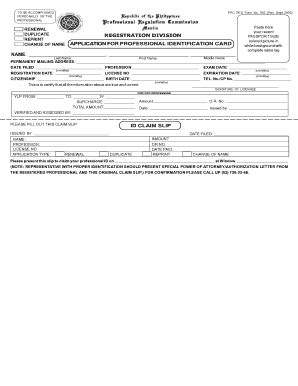
- Accurately fill in your name in the designated fields: Last Name, First Name, and Middle Name. Ensure that your name is spelled correctly as this will appear on your professional identification card.
- Attach a recent passport-size colored photograph with a white background in the space provided. Make sure the image includes your complete name tag for identification purposes.
- Provide your permanent mailing address clearly in the specified section to ensure proper communication regarding your application.
- Enter the date filed, your profession, exam date, registration date, license number, and expiration date as requested. This information is crucial for your renewal process.
- Fill in your citizenship and birth date accurately, along with your telephone or mobile phone number for contact purposes.
- Review all entries to certify that the information is true and correct. Then, sign in the provided area to validate your application.
- Submit the duly accomplished form along with the required documents at the designated assessment windows for further processing.
Complete your documents online today for a smooth renewal process.
Related links form
Application for renewal can be done through the PRC Online Services. Successful examinees will log on to https://online.prc.gov.ph. After printing the application form, the applicant will proceed on the appointment date and place to submit requirements.