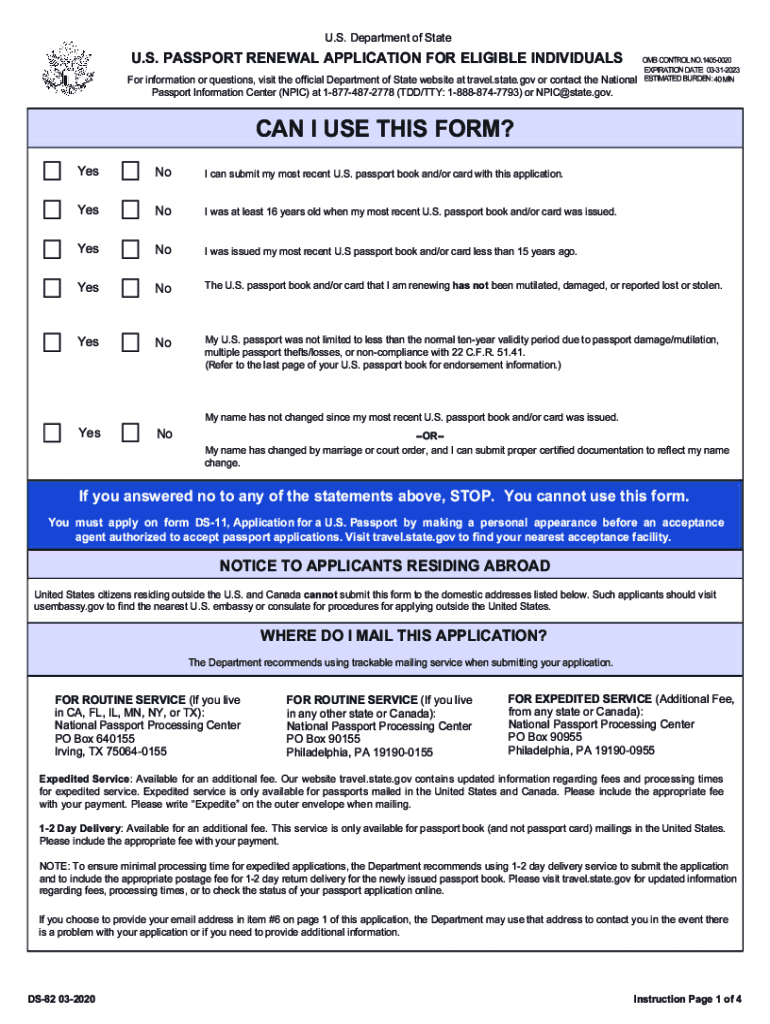
U.S. Department of StateU.S. PASSPORT RENEWAL APPLICATION FOR ELIGIBLE INDIVIDUALS For information or questions, visit the official Department of State website at travel.state.gov or contact the National.

Open form follow the instructions

Easily sign the form with your finger

Send filled & signed form or save
How to fill out the DS-82 online
Filling out the DS-82 form online for U.S. passport renewal can streamline your application process. This guide will provide you with clear, step-by-step instructions to help you complete the form accurately and efficiently.
Follow the steps to complete your DS-82 application online.
- Click ‘Get Form’ button to access the DS-82 renewal application and open it in your editor.
- Begin by providing your personal information in the designated fields. This includes your full name, date of birth, and contact information.
- Indicate your most recent U.S. passport details, including the passport number and expiration date. Make sure these match the documents you wish to renew.
- Answer the eligibility questions carefully. You must confirm that you meet the requirements for using the DS-82 form by answering ‘Yes’ or ‘No’ to each statement.
- If your name has changed since your last passport was issued, provide the necessary certified documentation that reflects this change.
- Select your preferred method of receiving your new passport, which may include requesting expedited service for an additional fee.
- Review all entered information for accuracy before submitting your application. This step is crucial to avoid any delays in processing.
- Once you are confident that all details are correct, you can save changes, download, print, or share the completed DS-82 form as needed.
Be proactive and complete your DS-82 application online to ensure a smooth renewal process.
Experience a faster way to fill out and sign forms on the web. Access the most extensive library of templates available.
Related content
If you answered no to any of the statements above, STOP. You cannot use this form. You...
You must apply on application form DS-11 by making a personal appearance before an...
GE-DS-82 and GE-DS-82-. PoE Managed Switch. Installation Sheet. Package Contents. Thank...
Get answers to your most pressing questions about US Legal Forms API.
What is a DS-82 form for?
Renewal of regular U.S. passport for an adult (DS-82 form)
How many photos do I need to renew my DS-82 passport?
A completed passport renewal application, form #DS-82. Your most recent passport. One recent passport photograph.
Does my passport DS-82 need to be printed in color?
Guidelines for Printing Forms They must be printed in black ink o n white paper. The paper must be 8 1/2 inches by 11 inches, with no holes or perforations, at least medium (20 lb.)
Who should use DS-11?
You must apply in person using Form DS-11 if at least one of the following is true: You are applying for your first U.S. passport. You are under age 16. Your previous U.S. passport was issued when you were under age 16.
Who is eligible for form DS-82?
You must submit form DS-82 If the following are true. Your U.S. Passport is undamaged and can be submitted with your application. Your U.S. Passport was issued when you were of age 16 or older. Your U.S. Passport was issues in your current name or you can legally document your name change.
Should I use DS-11 or DS-82?
Renewal Application (DS-82) You should complete this form if you meet our requirements to renew your passport. Keep in mind that children under age 16 cannot renew their passports and must apply using Form DS-11.
Can I submit DS-82 online?
You can fill out the form using the online form filler of the Department of State website (https://pptform.state.gov/) or print it out and fill it out by hand using a black pen. If you fill out the form electronically, at the end of the questionnaire there is an option to generate the form as a PDF file.
Use professional pre-built templates to fill in and sign documents online faster. Get access to thousands of forms.
If you believe that this page should be taken down, please follow our DMCA take down process here.