Loading
Get Il Dsd Cdts 71 2021-2026
How it works
-

Open form follow the instructions
-

Easily sign the form with your finger
-

Send filled & signed form or save
How to fill out the IL DSD CDTS 71 online
The IL DSD CDTS 71 is a crucial form for driver training schools seeking accreditation for Commercial Driver's License (CDL) training. This guide provides clear and comprehensive instructions for filling out the form online, ensuring users can effectively complete the process.
Follow the steps to complete the IL DSD CDTS 71 online.
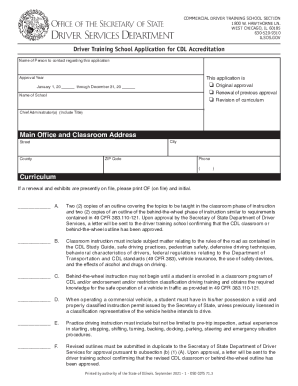
- Click ‘Get Form’ button to obtain the form and open it in the editor.
- Enter the name of the person to contact regarding the application. This is essential for any follow-up communication.
- Check the appropriate box to indicate the type of application: Original approval, Renewal of previous approval, or Revision of curriculum.
- Fill in the approval year by providing the start and end dates in the specified format.
- Provide the name of your school in the designated field.
- List the Chief Administrator(s) of the school, including their titles.
- Complete the Main Office and Classroom Address, including street, city, county, and ZIP code.
- Enter the main office phone number in the provided field.
- For curriculum details, specify if a renewal and exhibits are on file by writing 'OF' and initialing in the appropriate section.
- Provide summaries of the outlines for classroom and behind-the-wheel instruction, ensuring they align with federal requirements mentioned in the form.
- Confirm that all components of the curriculum, as outlined in Sections A through F, are included and appropriately detailed.
- Ensure you check the relevant boxes for any addendums related to out-of-state CDL application road requirements, hazmat, DOT medical requirements, or personal navigation device usage.
- In the records section, confirm the methods for keeping student records, ensuring they meet the specifications laid out in the form.
- Collect the required signatures from all relevant individuals, including each owner, partner, and majority corporate directors.
- Review the completed form for accuracy and completeness before proceeding to submit it.
- Save your changes, download the completed form, print it, or share it as needed.
Take action now and complete the IL DSD CDTS 71 online to streamline your accreditation process.