Loading
Get Irs 1095-a 2014
This website is not affiliated with IRS
How it works
-

Open form follow the instructions
-

Easily sign the form with your finger
-

Send filled & signed form or save
How to fill out the IRS 1095-A online
The IRS 1095-A form provides essential information for individuals who enrolled in health insurance coverage through the Health Insurance Marketplace. This guide will walk you through each section of the form to ensure that you accurately fill it out online.
Follow the steps to complete your IRS 1095-A online.
- Click the ‘Get Form’ button to obtain the form and open it in the editor.
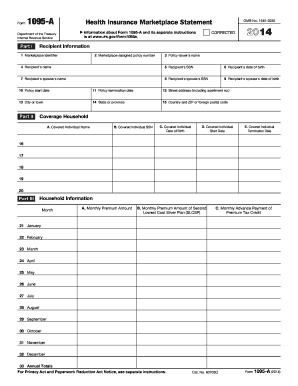
- In Part I, Recipient Information, enter the marketplace identifier from your health insurance provider. Next, input the marketplace-assigned policy number to identify your specific policy.
- Move to Part II, Coverage Household. Here, list the names of all covered individuals under your policy, their SSNs, dates of birth, and the start and termination dates of their coverage as applicable.
- In Part III, Household Information, enter the monthly premium amounts for your policy in column A. Include the monthly premium amount of the Second Lowest Cost Silver Plan (SLCSP) in column B.
- Once you have filled out all sections of the form, review the information for accuracy.
Complete your IRS 1095-A form online today to ensure your health coverage is properly documented.
Get form
Experience a faster way to fill out and sign forms on the web. Access the most extensive library of templates available.
The IRS 1095-A form plays a crucial role in how your tax return is calculated, especially if you received health insurance through the Marketplace. It influences the calculation of premium tax credits, which can lower your tax bill or increase your refund. Accurately reporting this form can ensure you maximize your potential benefits.
Get This Form Now!
Use professional pre-built templates to fill in and sign documents online faster. Get access to thousands of forms.