Loading
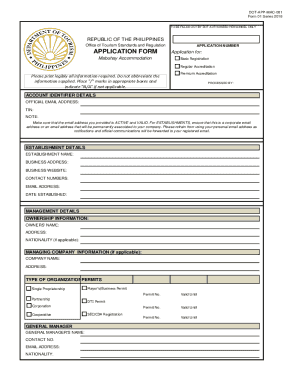
Get Application Form (ots - 001) - Department Of Tourism
How it works
-

Open form follow the instructions
-

Easily sign the form with your finger
-

Send filled & signed form or save
How to fill out the Application Form (OTS - 001) - Department Of Tourism online
Filling out the Application Form (OTS - 001) for the Department of Tourism is a crucial step in obtaining the necessary accreditation for your establishment. This guide provides a clear and supportive approach to completing the form accurately and efficiently online.
Follow the steps to complete your application form successfully.
- Click ‘Get Form’ button to obtain the form and open it in the editor.
- Begin with the 'Application for' section. Select the appropriate accreditation type by marking the corresponding box: Basic Registration, Regular Accreditation, or Premium Accreditation. Ensure you check the correct option.
- In the 'Account Identifier Details', provide your official email address, Tax Identification Number (TIN), and make sure your email is active and can receive notifications.
- Fill in the 'Establishment Details' section. You will need to include the establishment name, business address, business website, contact numbers, email address, and the date established. Ensure to provide accurate and complete information.
- Complete the 'Management Details' by providing the ownership information, including the owners' names, addresses, and nationalities if applicable. If your establishment is managed by another company, include the managing company details as well.
- Identify the 'Type of Organization' and select from options such as Single Proprietorship, Partnership, Corporation, or Cooperative. Ensure that you also have your permits ready, including the Mayor's/Business Permit.
- In the 'Capitalization' section, list stockholders' names along with their positions, nationalities, amount subscribed, and amount paid up as necessary.
- Provide specific details about your establishment, including the total number of rooms, the types of rooms available, as well as the total number of conference rooms and any function room details.
- Fill out the 'Authorized Representative' section with the representative's full name, designation, contact numbers, and email address.
- After filling all the necessary information, certify the application by providing your signature over your printed name, position, and the date.
- Ensure you review all sections for accuracy, save your changes, and then download, print, or share the form as needed for your records.
Start filling out your Application Form (OTS - 001) online today to secure your accreditation.
Forms of tourism: There are three basic forms of tourism: domestic tourism, inbound tourism, and outbound tourism.
Industry-leading security and compliance
US Legal Forms protects your data by complying with industry-specific security standards.
-
In businnes since 199725+ years providing professional legal documents.
-
Accredited businessGuarantees that a business meets BBB accreditation standards in the US and Canada.
-
Secured by BraintreeValidated Level 1 PCI DSS compliant payment gateway that accepts most major credit and debit card brands from across the globe.