Loading
Get Customer Acquisition Form
How it works
-

Open form follow the instructions
-

Easily sign the form with your finger
-

Send filled & signed form or save
How to fill out the CUSTOMER ACQUISITION FORM online
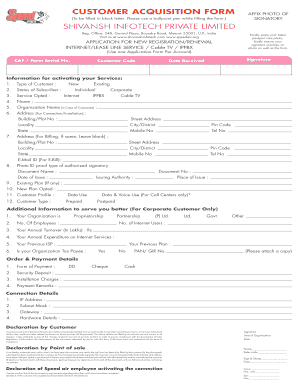
Completing the Customer Acquisition Form online is a straightforward process that allows users to apply for new internet services or renew existing ones. This guide provides step-by-step instructions to help you navigate each section of the form with ease.
Follow the steps to successfully complete the form online.
- Click the ‘Get Form’ button to access the Customer Acquisition Form and open it in your editor.
- Begin by filling in your personal information. In the 'Type of Customer' section, select whether you are an 'Individual' or 'Corporate'. Then indicate your 'Status of Subscriber' as either 'New' or 'Existing'.
- In the 'Service Opted' section, choose the specific service you wish to apply for, such as 'Internet', 'Cable TV', or 'IPPBX'. Next, provide your full name and the organization name if you are applying on behalf of a company.
- Fill in your address details. Provide the building or plot number, street address, locality, city or district, pin code, and state. You also need to enter your mobile number and telephone number.
- If billing information differs from your main address, provide that information in the designated section. If it is the same, you can leave it blank.
- Specify your email ID for electronic billing notifications.
- Select the type of photo ID proof you are submitting for the authorized signatory and fill in the document name and number, along with the date of issue.
- In the 'Existing Plan' section, indicate if you have any current services, and then list the new plan you wish to opt for.
- Provide your customer profile details, including your customer type, the number of internet users, prior ISP, and any other relevant information for corporate customers.
- Fill in your order and payment details, such as the form of payment (DD, cheque, cash), security deposit, and installation charges.
- Complete the connection details, including your desired IP address, subnet mask, and gateway.
- Carefully read the declaration sections, affirming that all information provided is accurate. Ensure you sign and date the form where required.
- Finally, save your changes, and utilize options to download, print, or share the completed form as needed.
Complete your CUSTOMER ACQUISITION FORM online today to access your preferred services.
Related links form
Customer acquisition is the process of getting potential customers to buy your products. A strong customer acquisition strategy: 1) attracts leads, 2) nurtures them until they become sales-ready, and 3) converts them into customers. The overall cost of these steps is referred to as your customer acquisition cost (CAC).
Industry-leading security and compliance
US Legal Forms protects your data by complying with industry-specific security standards.
-
In businnes since 199725+ years providing professional legal documents.
-
Accredited businessGuarantees that a business meets BBB accreditation standards in the US and Canada.
-
Secured by BraintreeValidated Level 1 PCI DSS compliant payment gateway that accepts most major credit and debit card brands from across the globe.